
Variety Testing (Pre-Release)
| Form | Workflow | Outputs | E2E test | Docs |
|---|---|---|---|---|
| Passed | Passed | Passed | Passed | Passed |
- End-to-end test
- 8/8 passed 2026-10-17 (mihud, combined)
- Documentation
- 18 steps, 22 images · Download the DOCX
- Who can apply
- Organization, Individual
- Catalogue ID
- 250
Fees
| Fee | Case | Amount (ZMW) |
|---|---|---|
| Pre-Release fee per Application (if the case is for first season of testing only) | New | 20 |
| DUS Testing fee per variety per year | New | 150 |
| National Variety Release Trials fee per variety per site per year | New | 150 |
Required documents
- National Identity Card (NRC) (New)
- Botanical Information (that is, a Completed Crop Specific Technical Questionnaire) (New)
- Descriptors for the Parents to the new variety (as per OECD requirements) (New)
- Certificate of Incorporation / ZDA (if company, church, society) (New)
Output documents
- Notice of Action (notice-of-action)
- Application form (application)
- GF-1 Treasury Invoice (invoice)
- GF-2 Treasury Receipt (receipt)
Test evidence
Variety Testing (Pre-Release)
Service documentation · Republic of Zambia · GSB e-Services
| Owner | Seed Control and Certification Institute |
| Service key | scci/variety-testing-pre-release |
| Version | service v1, platform 9e8768d3 |
| Date | 2026-10-15 |
Generated automatically by the service's end-to-end test run. Every screenshot shows synthetic test data on a local test installation, never real personal data.
This document describes the Variety Testing (Pre-Release) service of Seed Control and Certification Institute as the platform runs it today. It is generated by the service's end-to-end test: every step below was performed by the test, and every screenshot was taken during that run with synthetic data. Regenerate it with npm run docs:services in the e2e suite; do not edit it by hand.
1. Service summary
| Item | Detail |
|---|---|
| Service | Variety Testing (Pre-Release) |
| Owner (MDA) | Seed Control and Certification Institute (SCCI) |
| Purpose | Service offered to Variety Owners or their Representatives to assess the value for cultivation and use of a new variety. |
| Who can apply | Organization; Individual |
| How to apply | Online on the national e-Services portal, signed in with ZamPass; pay with ZamPay. |
| Fees | Pre-Release fee per Application (if the case is for first season of testing only): USD 20.00 DUS Testing fee per variety per year: USD 150.00 National Variety Release Trials fee per variety per site per year: USD 150.00 |
| Turnaround | Minimum two (2) years - from application to Variety Release |
| Validity of the output | One (1) year |
| Required documents | National Identity Card (NRC) (required) Certificate of Incorporation / ZDA (if company, church, society) (required) Botanical Information (that is, a Completed Crop Specific Technical Questionnaire) (required) Descriptors for the Parents to the new variety (as per OECD requirements) (required) |
| Output documents | Notice of Action Application form GF-1 Treasury Invoice GF-2 Treasury Receipt |
| Legal basis | Plant Variety and Seeds Act (Laws, Volume XIV, Cap. 236) (https://www.parliament.gov.zm/sites/default/files/documents/acts/Plant%20Variety%20and%20Seeds%20Act.pdf) Plant Variety and Seeds Regulation (SI No. 23 of 2018) (https://www.parliament.gov.zm/sites/default/files/documents/acts/Plant%20Variety%20and%20Seeds%20Act.pdf) |
2. Application process, step by step
The process as configured in the back office:
| Step | Role | Task | Type |
|---|---|---|---|
| 1 | Applicant | Apply | form |
| 2 | Case Officer | Generate Payment | generate-payment |
| 3 | Applicant | Payment | payment |
| 4 | System | Generate Document | generate-document |
| 5 | Case Officer | Review | review |
| 6 | Supervisor | Review | review |
| 7 | Case Officer | Verify Payment | verify-payment |
| 8 | Case Officer | Laboratory | samples-laboratory |
| 9 | Supervisor | Committee decision | approve |
| 10 | System | Generate Document | generate-document |
| 11 | System | Notify Client | notify |
Who takes part in this journey: Citizen, Case Officer, Accountant, Supervisor, Laboratory technician, Laboratory head (Supervisor), Committee secretary (Supervisor).
Step 1. Find the service
Citizen · National e-Services portal
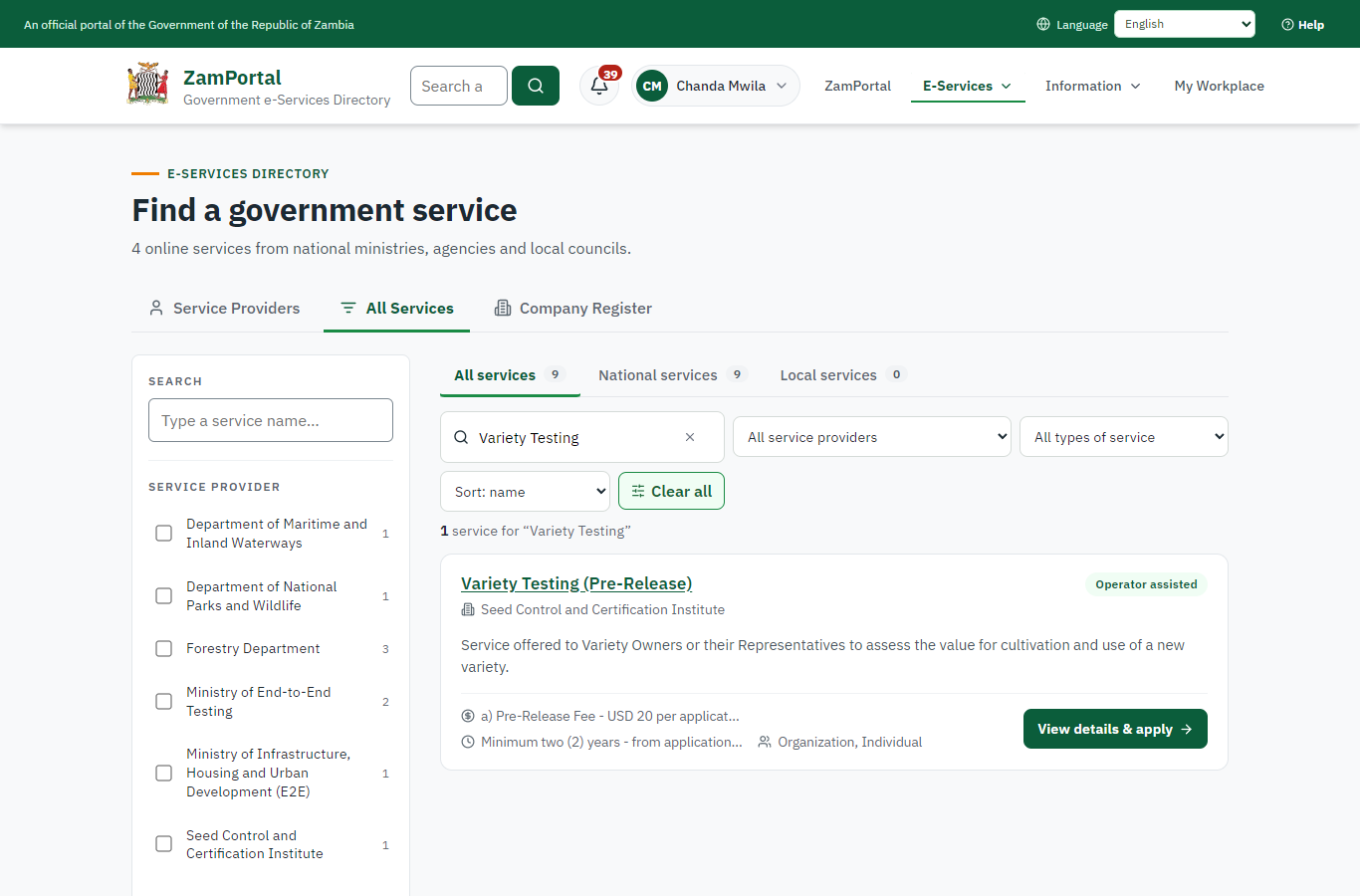
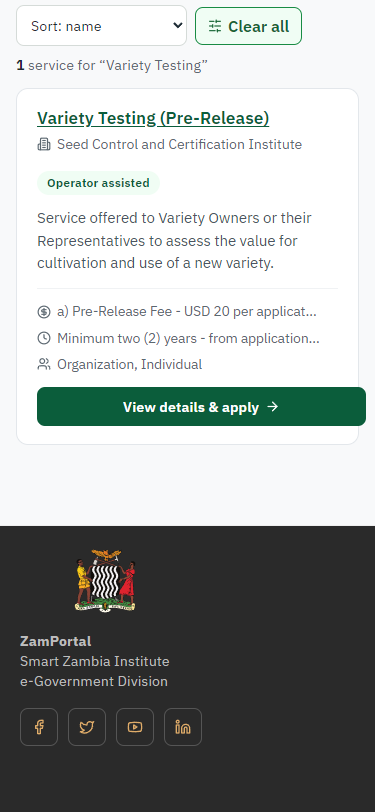
On the national e-Services portal the citizen opens All Services and searches for the service by name ("Variety Testing"). Each result names the service and the ministry that provides it.
Step 2. Read the service page
Citizen · National e-Services portal
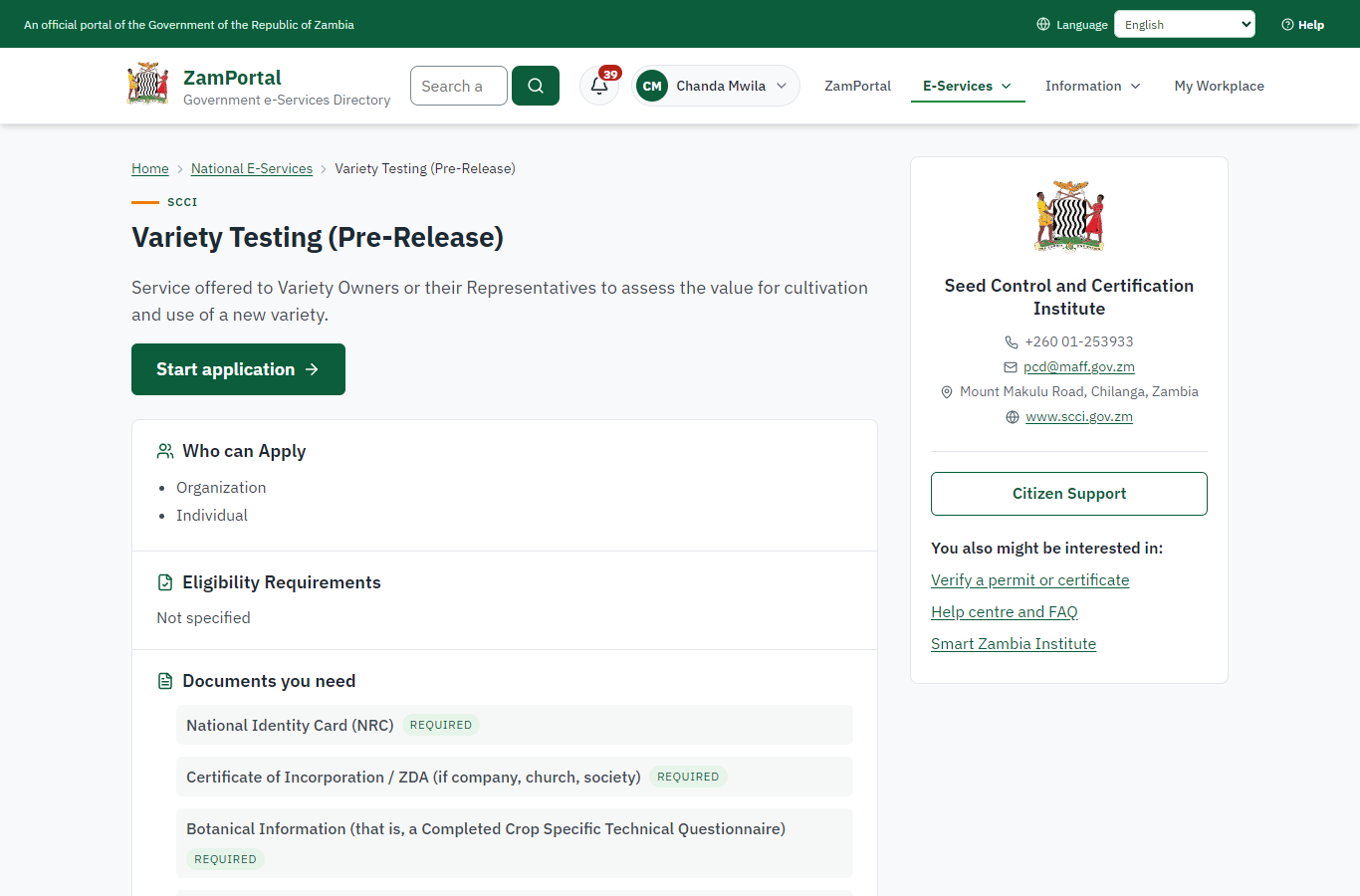
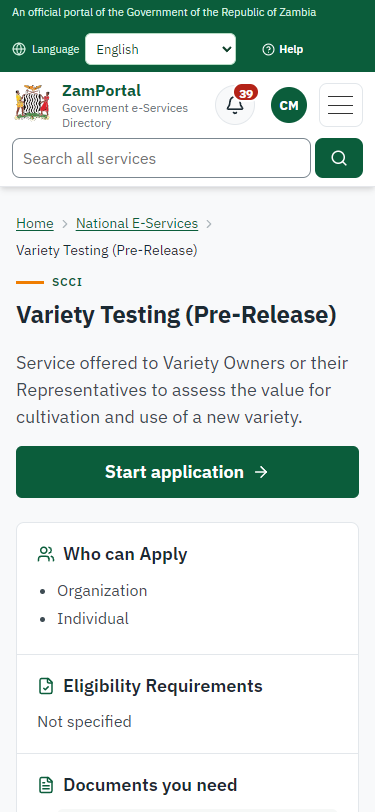
The service page sets out what the service is for, who provides it, the fee, how long it takes and the documents to have ready. "Start application" begins an application (the citizen is signed in with ZamPass).
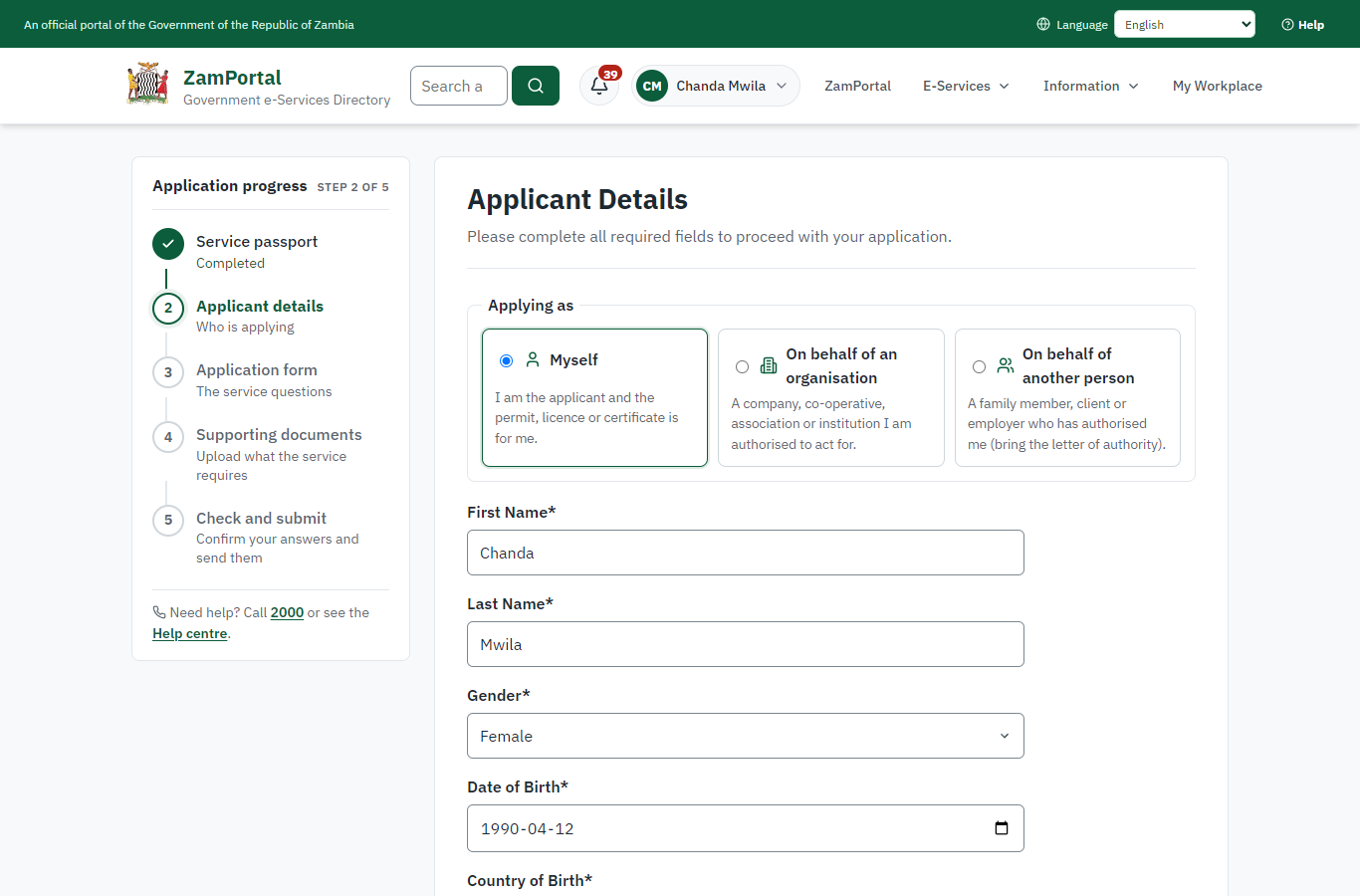
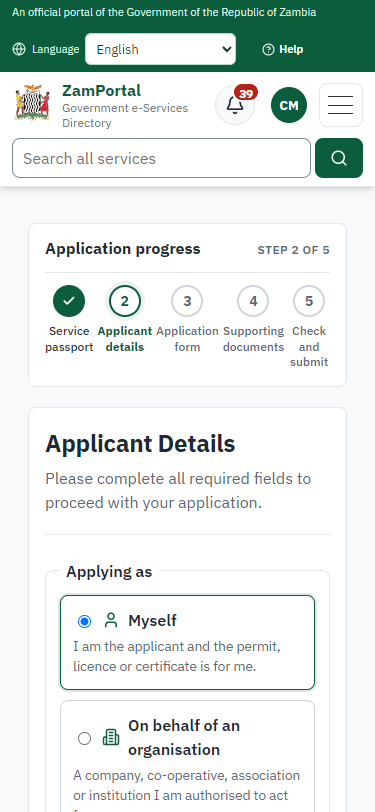
Step 3. Confirm the applicant details
Citizen · National e-Services portal
The applicant details are filled in from the citizen's ZamPass account. The citizen says whom they are applying for (themself here) and continues with "Proceed to Application".
Step 4. Give the particulars of the variety
Citizen · National e-Services portal
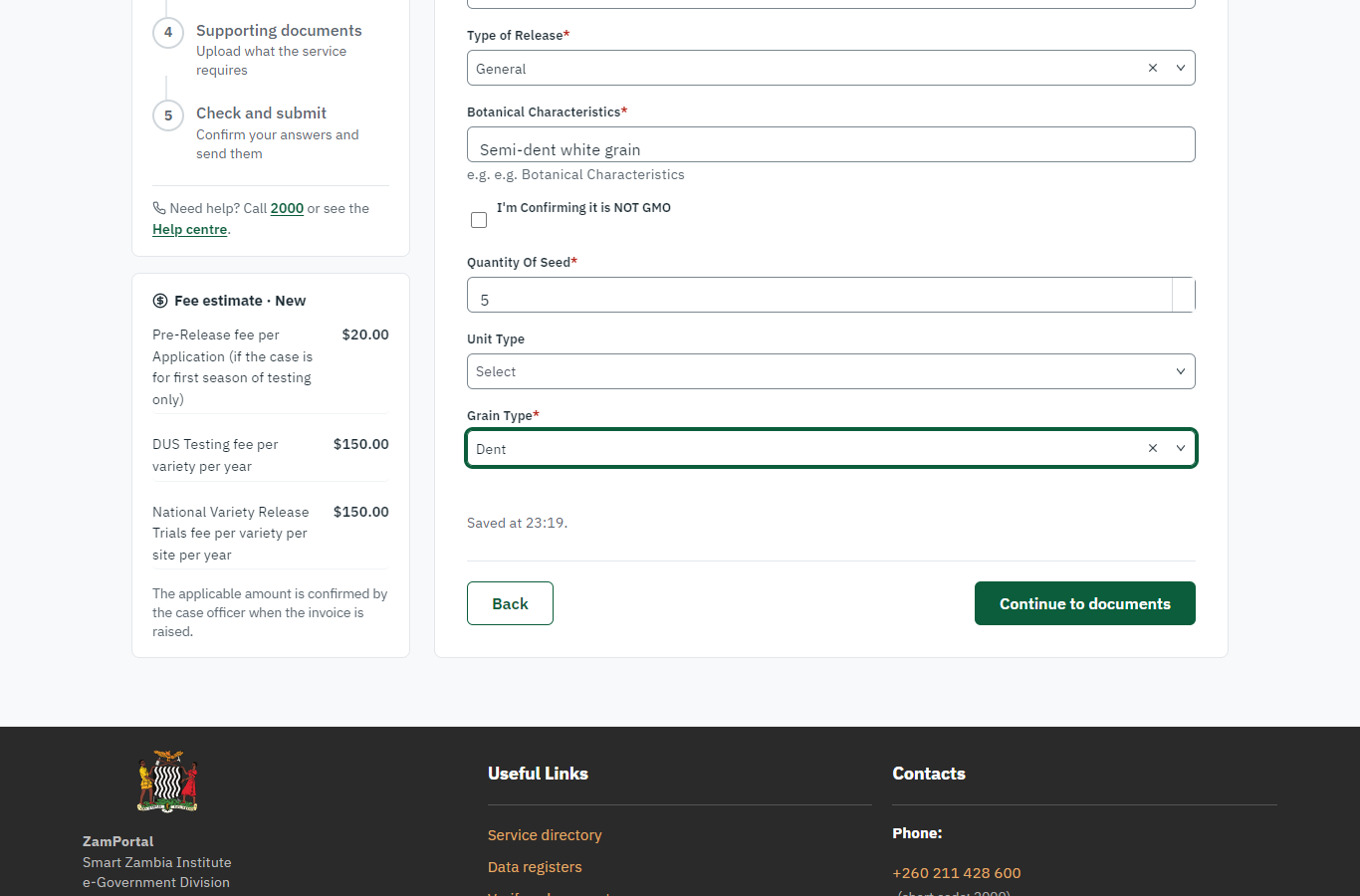
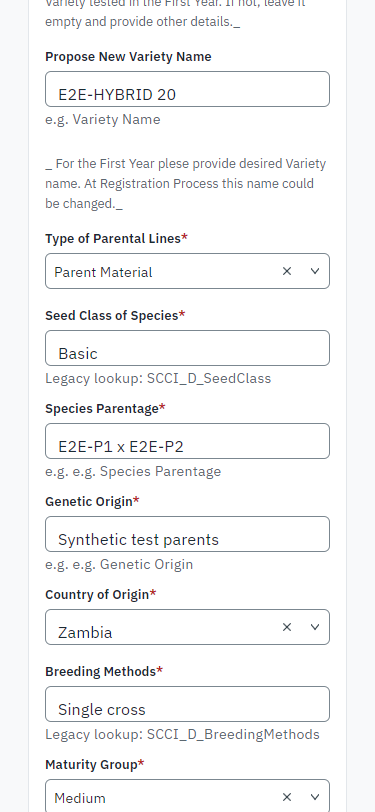
The form is the legacy service's own, imported: species, the preliminary designation and the proposed name of the new variety, its parental lines, parentage, origin, breeding method, maturity group, type of release, botanical characteristics, the quantity of seed supplied for testing and the grain type. The legacy service lists three fees for a new application (pre-release, DUS per year, national variety release trials per site and year); the fee that applies is priced on the server.
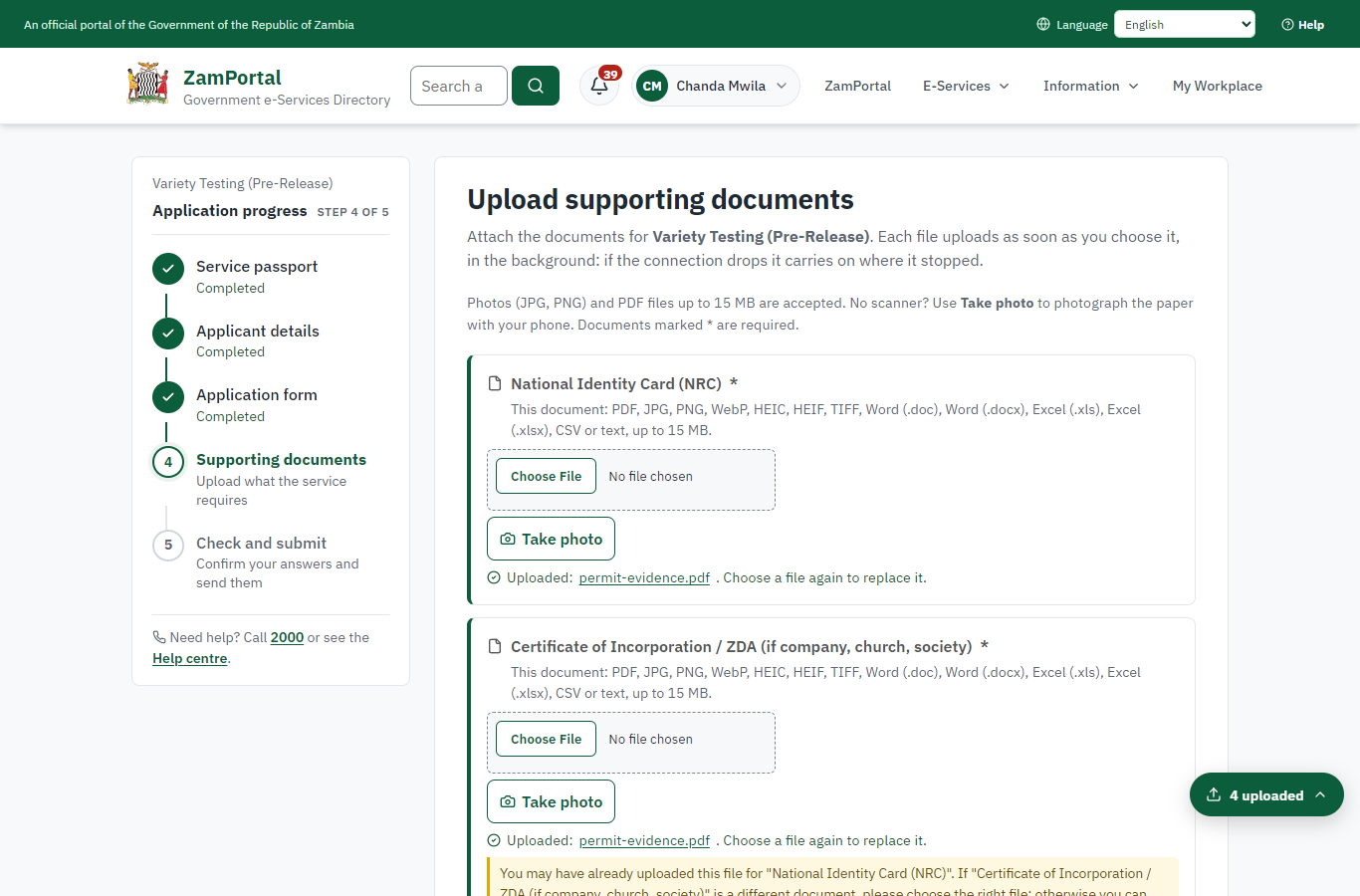
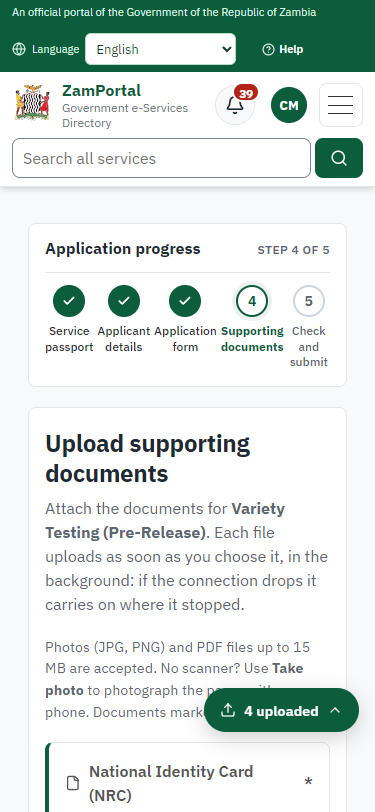
Step 5. Upload the documents
Citizen · National e-Services portal
The documents the legacy service asked for: the NRC, the botanical information (the crop-specific technical questionnaire), the descriptors of the parents (OECD) and the others listed. Synthetic files in this run.
Step 6. Application sent
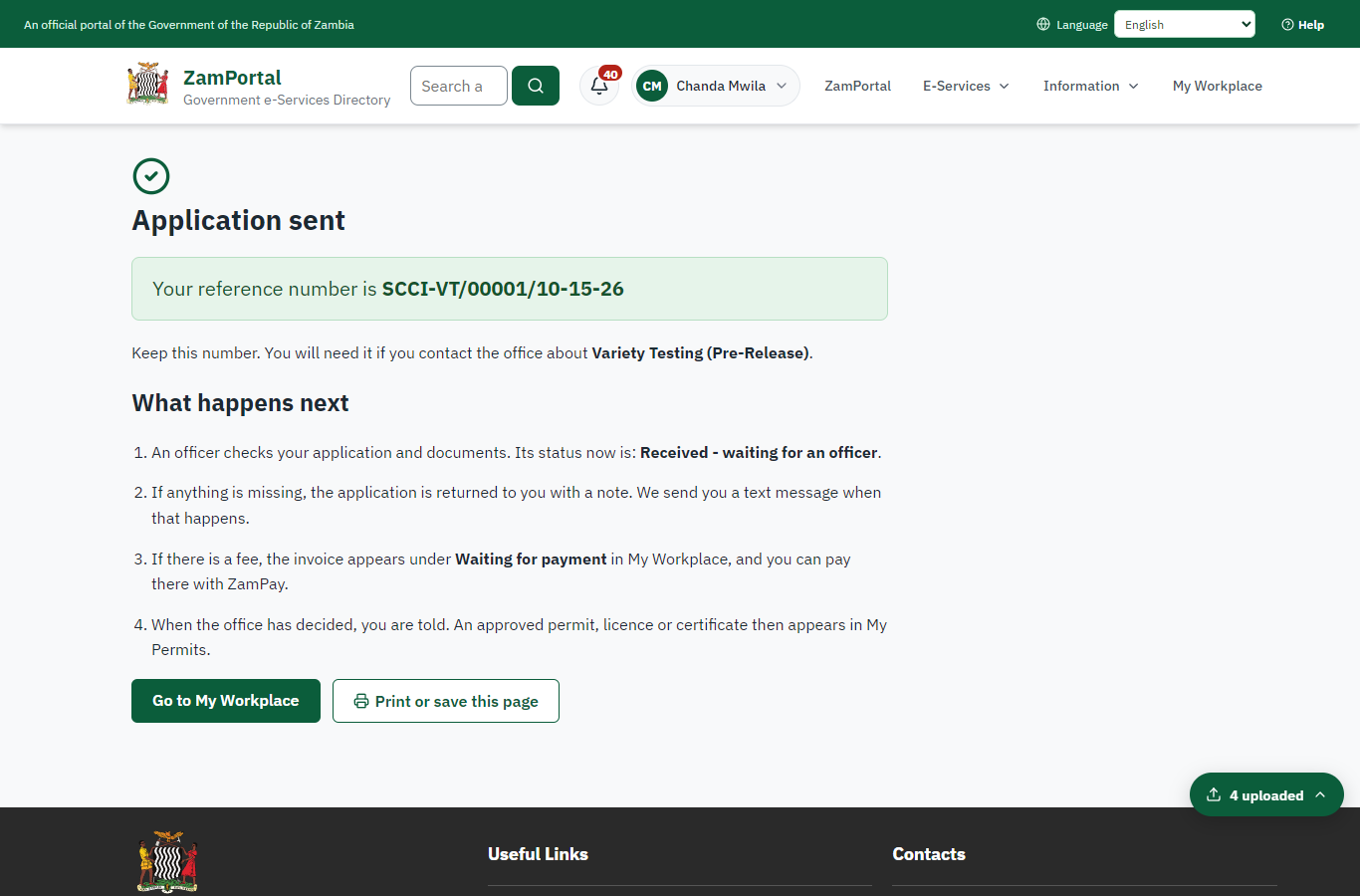
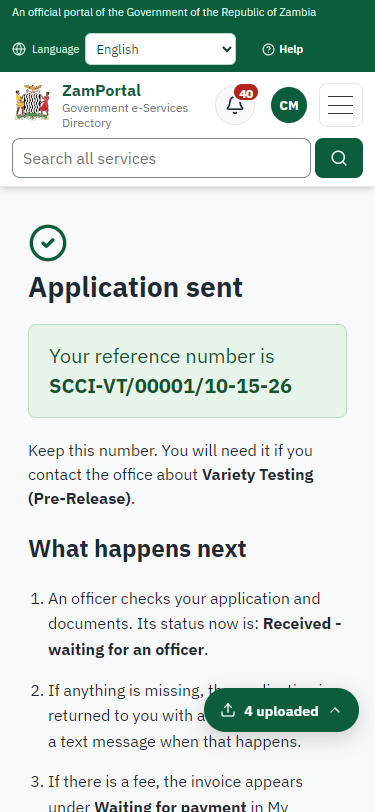
Citizen · National e-Services portal
The portal confirms the application with SCCI's reference number (SCCI-VT/00001/10-15-26 in this run). The legacy service lists three possible fees; SCCI works out which apply and the citizen is then invoiced.
Step 7. Take the application on
Case Officer · Back office
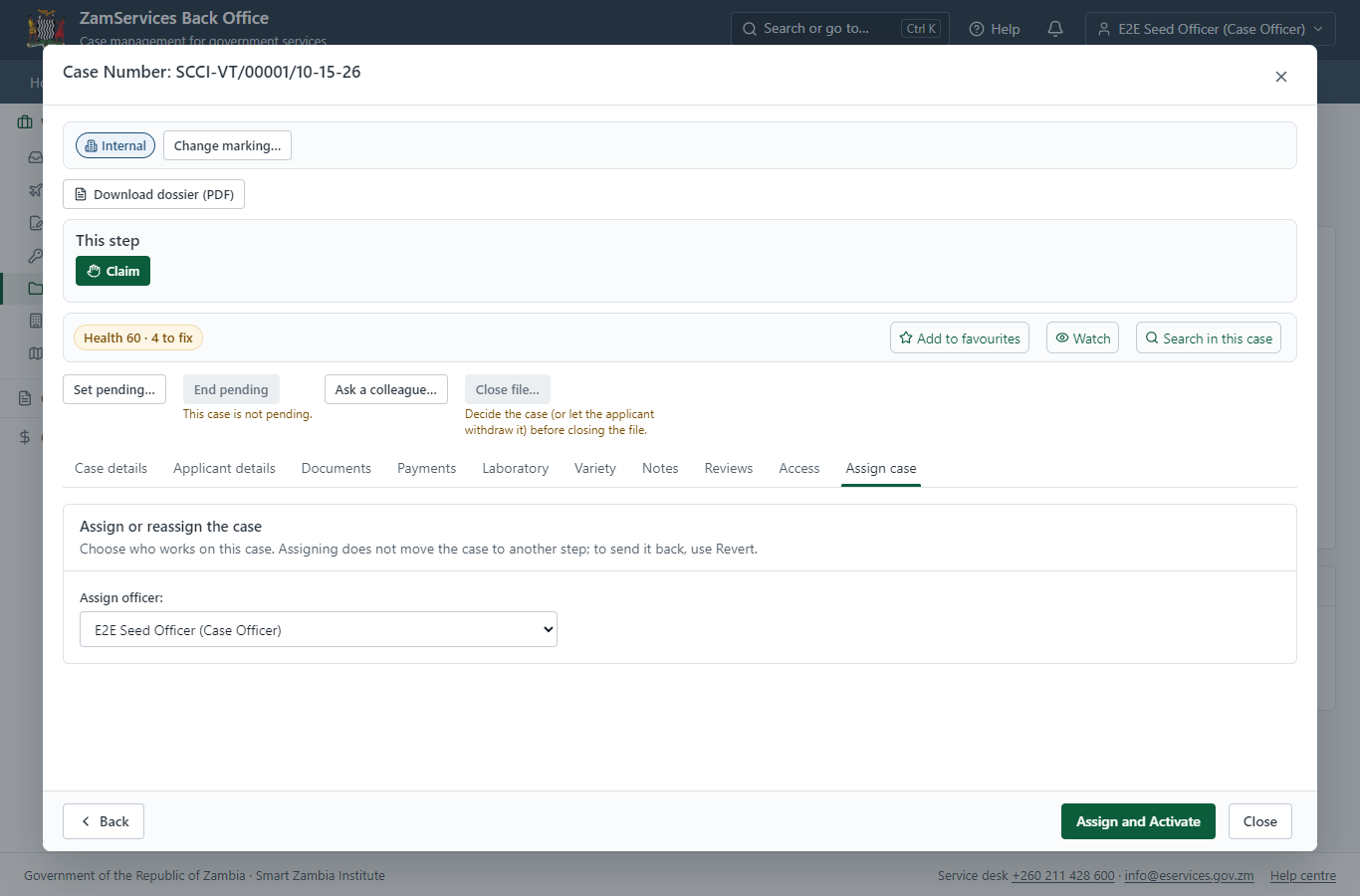
The paid application arrives in SCCI's case list (only SCCI's staff see it). The officer assigns it to themself.
Step 8. Work out the application fee
Case Officer · Back office
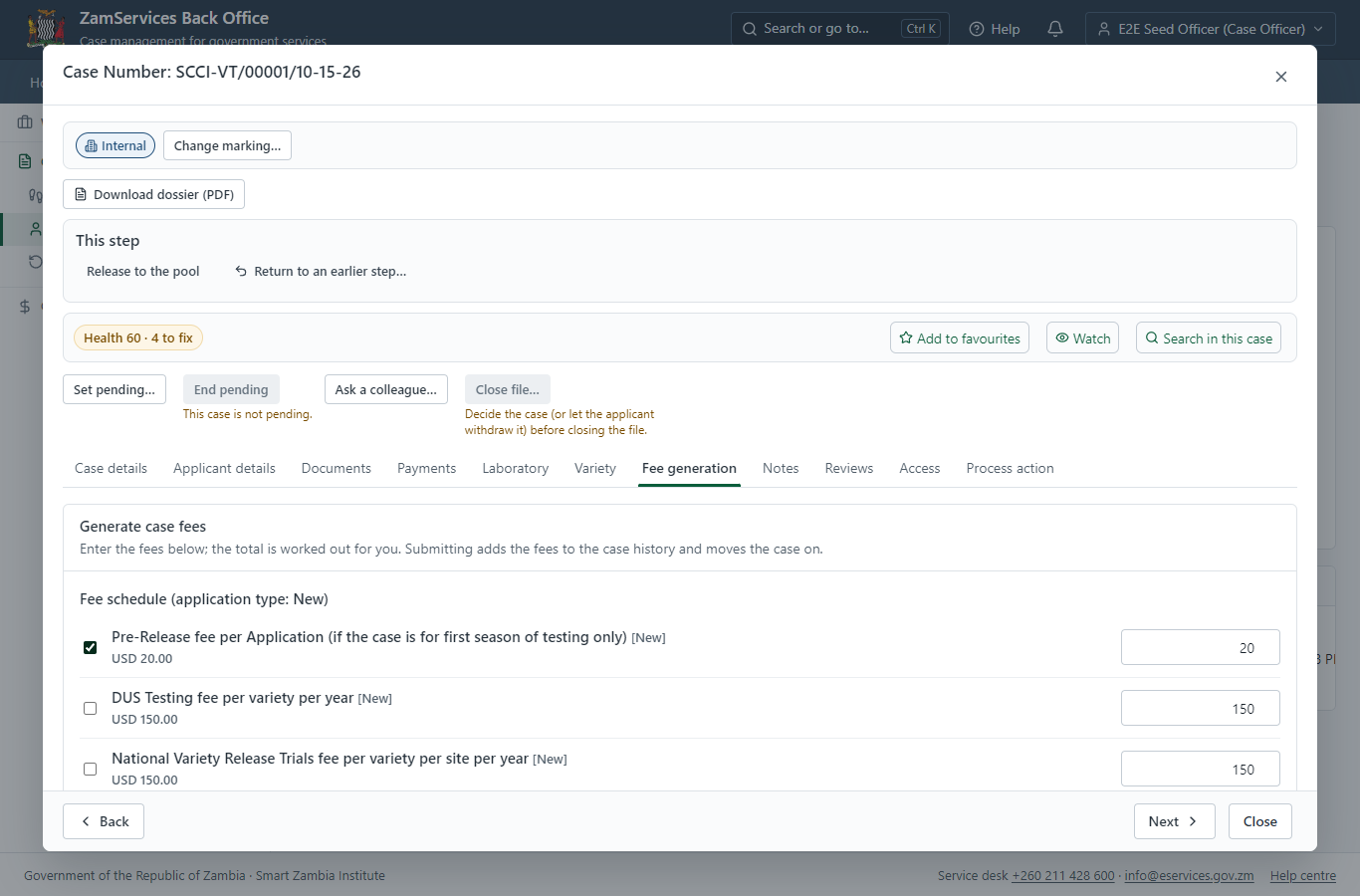
The legacy service lists three fees for a new application: the pre-release fee (K20.00 for the first season of testing), the DUS testing fee and the national variety release trial fee per site and year. The officer sets the fee that applies now - the pre-release fee; the tests are charged on the laboratory quotation later - and "Submit Fees and Advance" raises the invoice for the applicant.
Step 9. Pay the application fee
Citizen · National e-Services portal
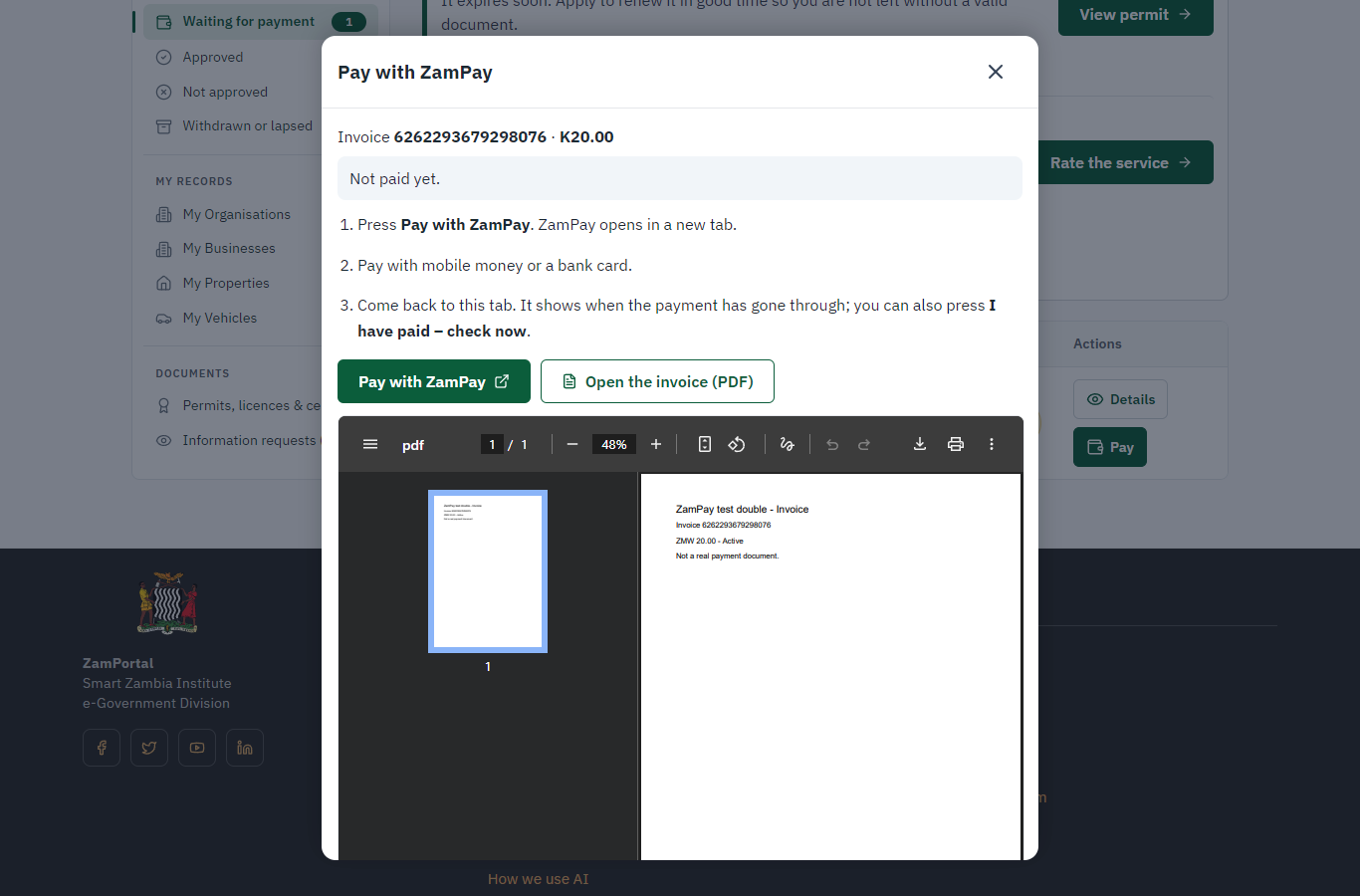
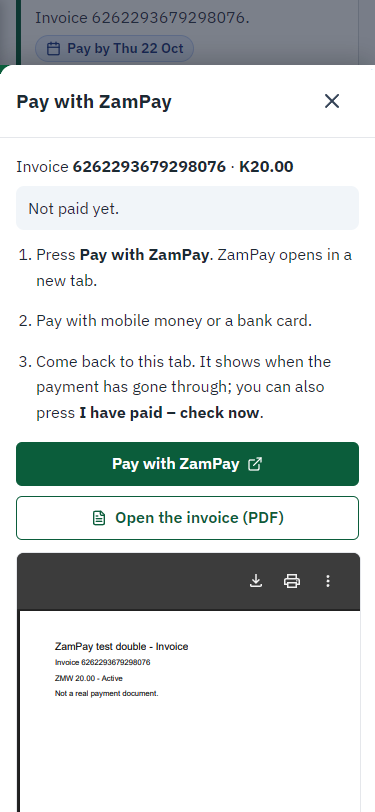
The application shows "Waiting for your payment" in My Workplace. Pay opens the invoice (K20.00, the pre-release fee); the citizen pays at ZamPay by mobile money or card.
Step 10. Register the seed sample
Case Officer · Back office
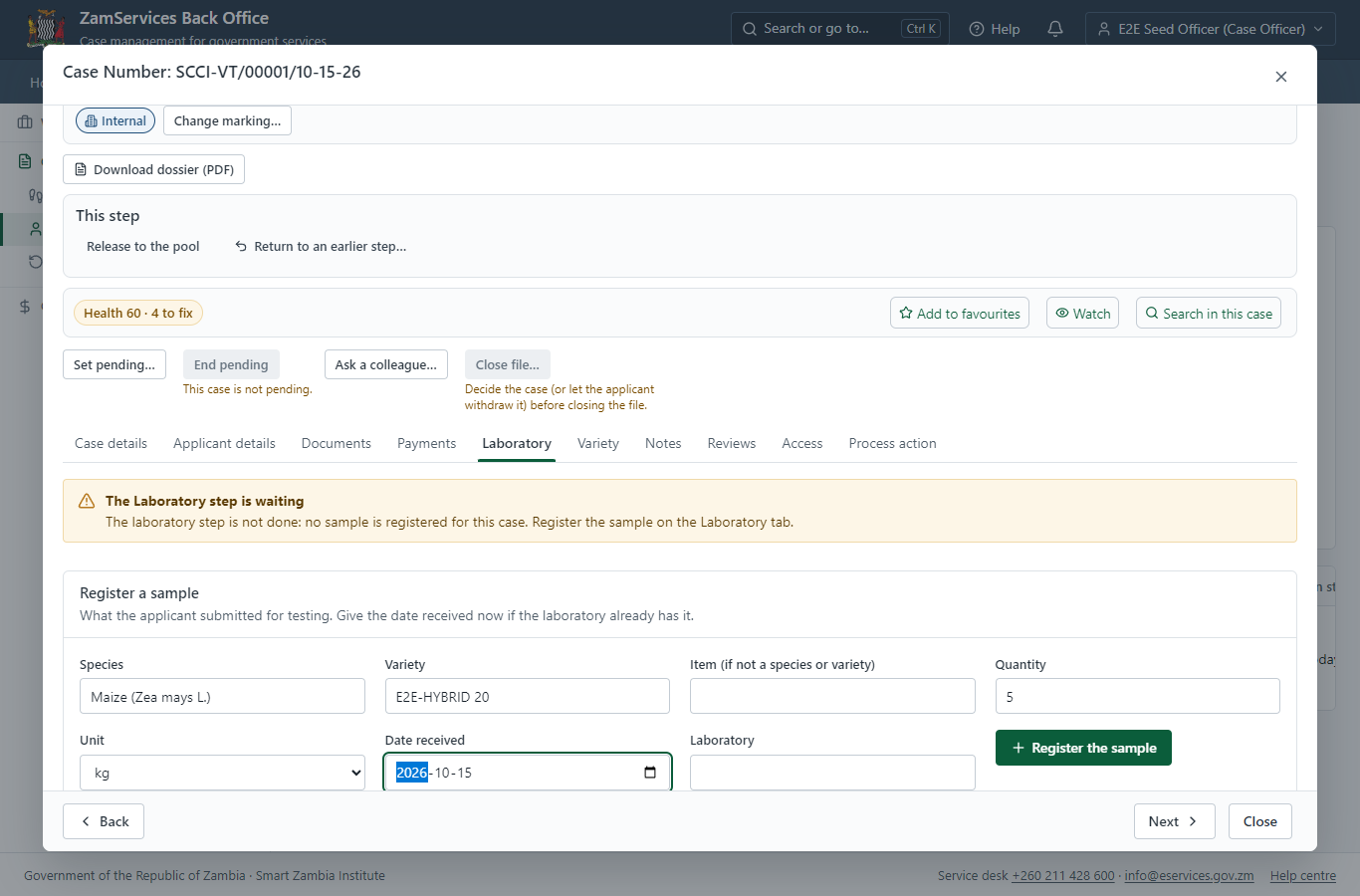
On the case's Laboratory tab the officer registers what the applicant supplied: species, variety, quantity (5 kg) and the date the laboratory received it. The banner at the top is the server's own verdict on the Laboratory step: it holds until every sample has a signed report.
Step 11. Plan the DUS and VCU tests
Case Officer · Back office
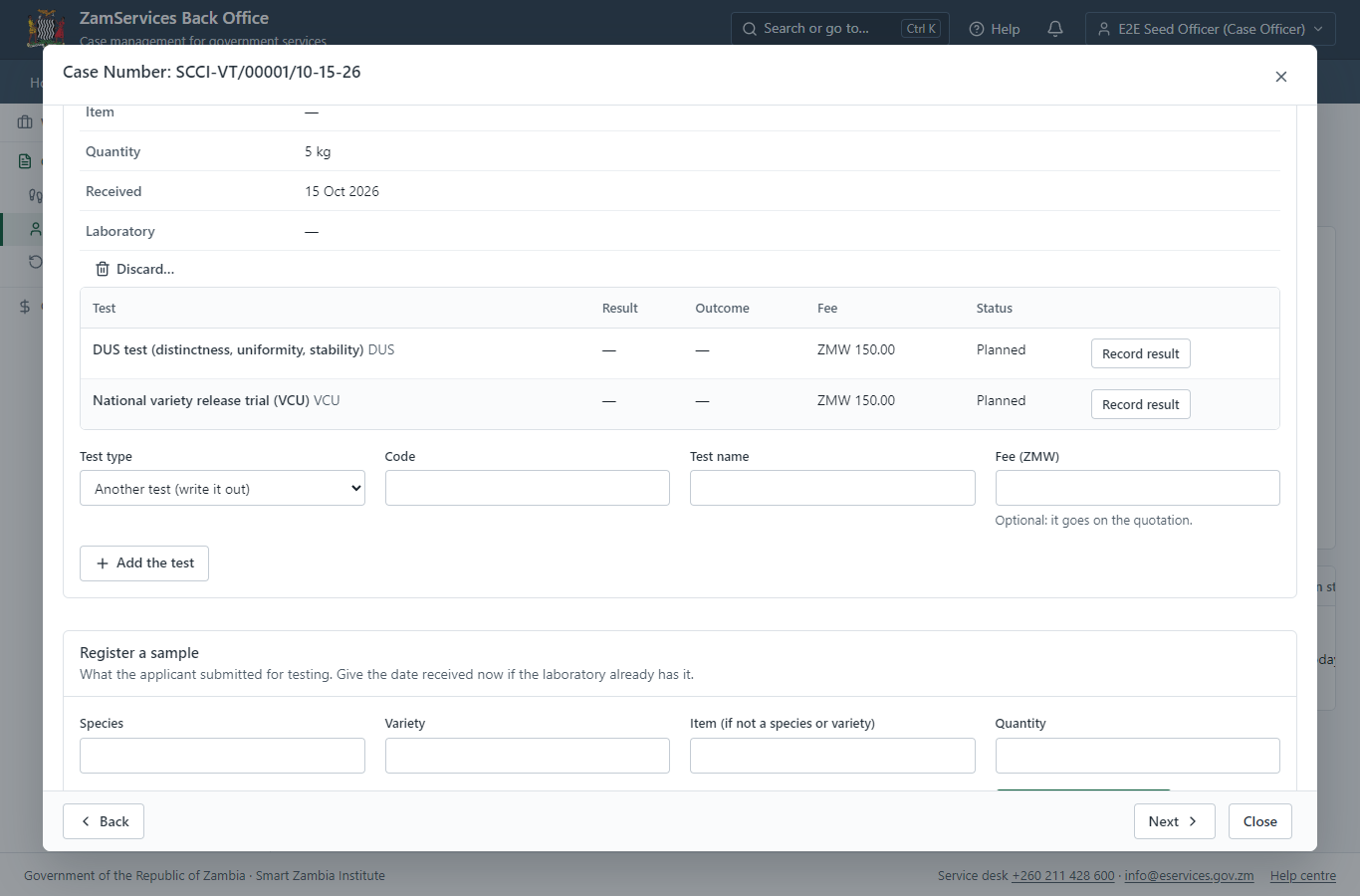
The officer plans the tests from the laboratory's list of test types: the DUS test (distinctness, uniformity, stability) and the national variety release trial (VCU), each with its method and fee.
Step 12. Ask finance for the quotation
Case Officer · Back office
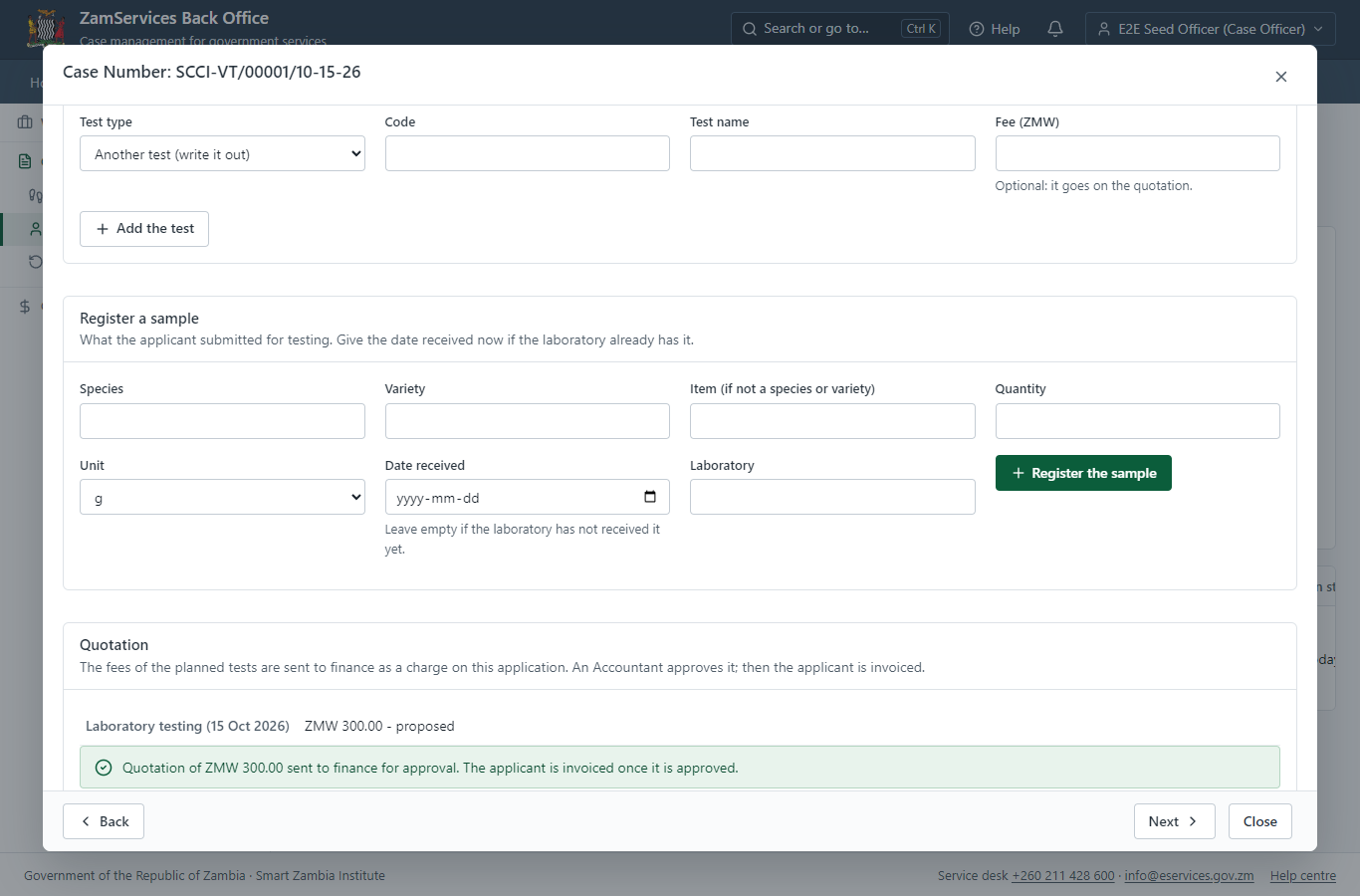
The fees of the planned tests (ZMW 300.00 in this run) go to finance as a charge on the application. The applicant sees nothing until an Accountant approves it; the officer who proposed it cannot approve it.
Step 13. Approve the laboratory quotation
Accountant · Back office (done through its case API in the test run: no screenshot)
An Accountant of SCCI checks the quotation (the planned tests and their fees) and approves it. The charge is added to the application and invoiced to the applicant at once.
Step 14. Approve and sign the quotation step
Supervisor · Back office (done through its case API in the test run: no screenshot)
The supervisor completes the legacy "Approve and Sign Quotation" step. The next step - checking that the quotation is paid - holds while an invoice of the application is unpaid.
Step 15. Record the test results
Laboratory technician · Back office (done through its case API in the test run: no screenshot)
The technician records the result of each test: the DUS test (distinct, uniform, stable) and the VCU trial (8.4 t/ha). A result can be corrected until the report is signed - never after.
Step 16. Sign the DUS report
Laboratory head (Supervisor) · Back office
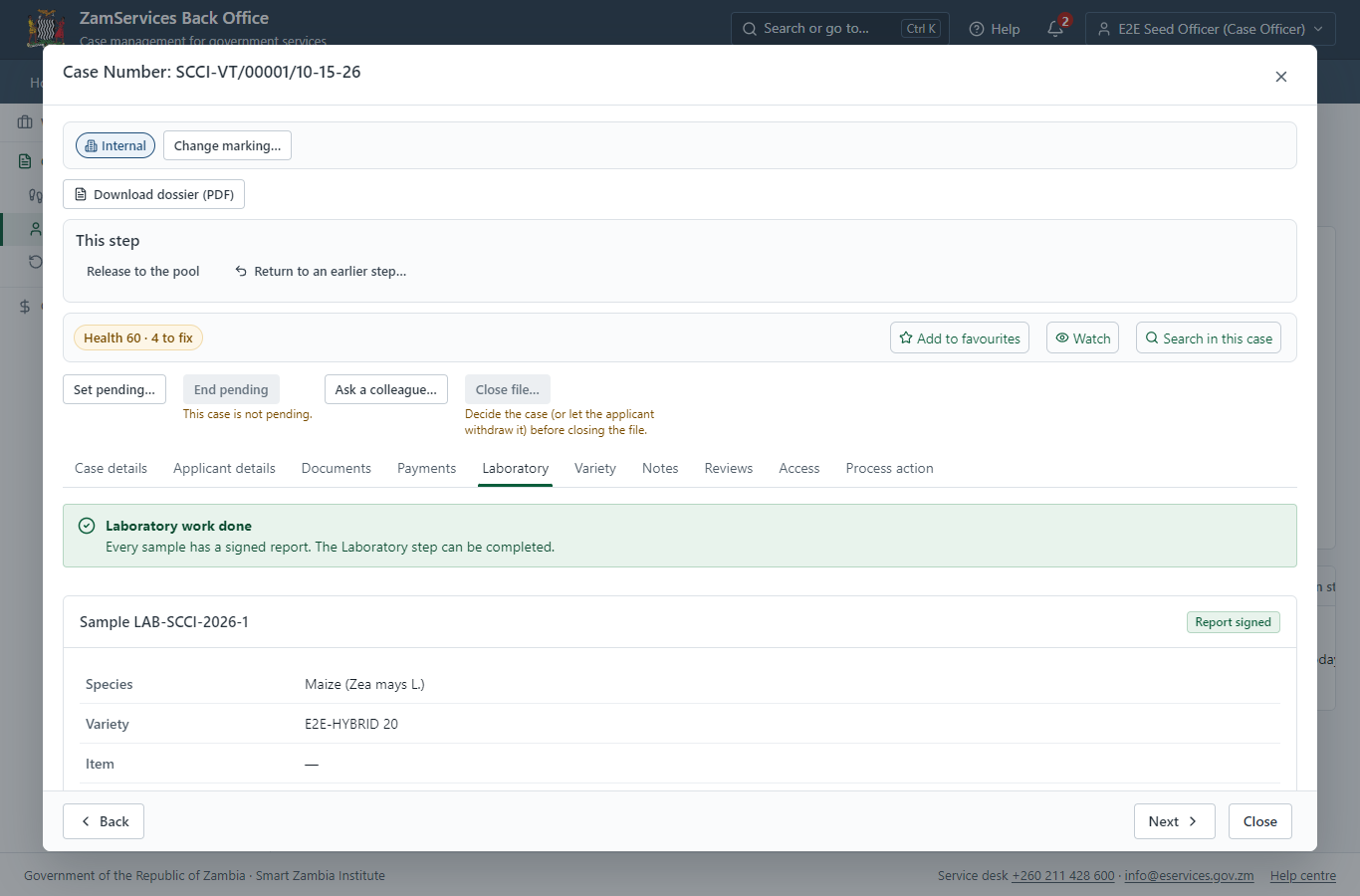
A lead officer of the laboratory who recorded no result checks and signs the report (LR-SCCI-2026-1 in this run). The results are frozen into it, the PDF is sealed with the platform's electronic seal when the installation has one - and says plainly when it is not - and it is added to the case documents for the deciding officers. The Laboratory step can now be completed.
Step 17. The variety committee decides
Committee secretary (Supervisor) · Back office (done through its case API in the test run: no screenshot)
The secretary puts the application on the agenda of a meeting of the Variety Release Committee (VRC/2026/1 in this run), records who attended (the quorum is checked) and the resolution "approve" with its reasons, and closes the meeting. Closing it decides the application; the minutes are kept with the meeting.
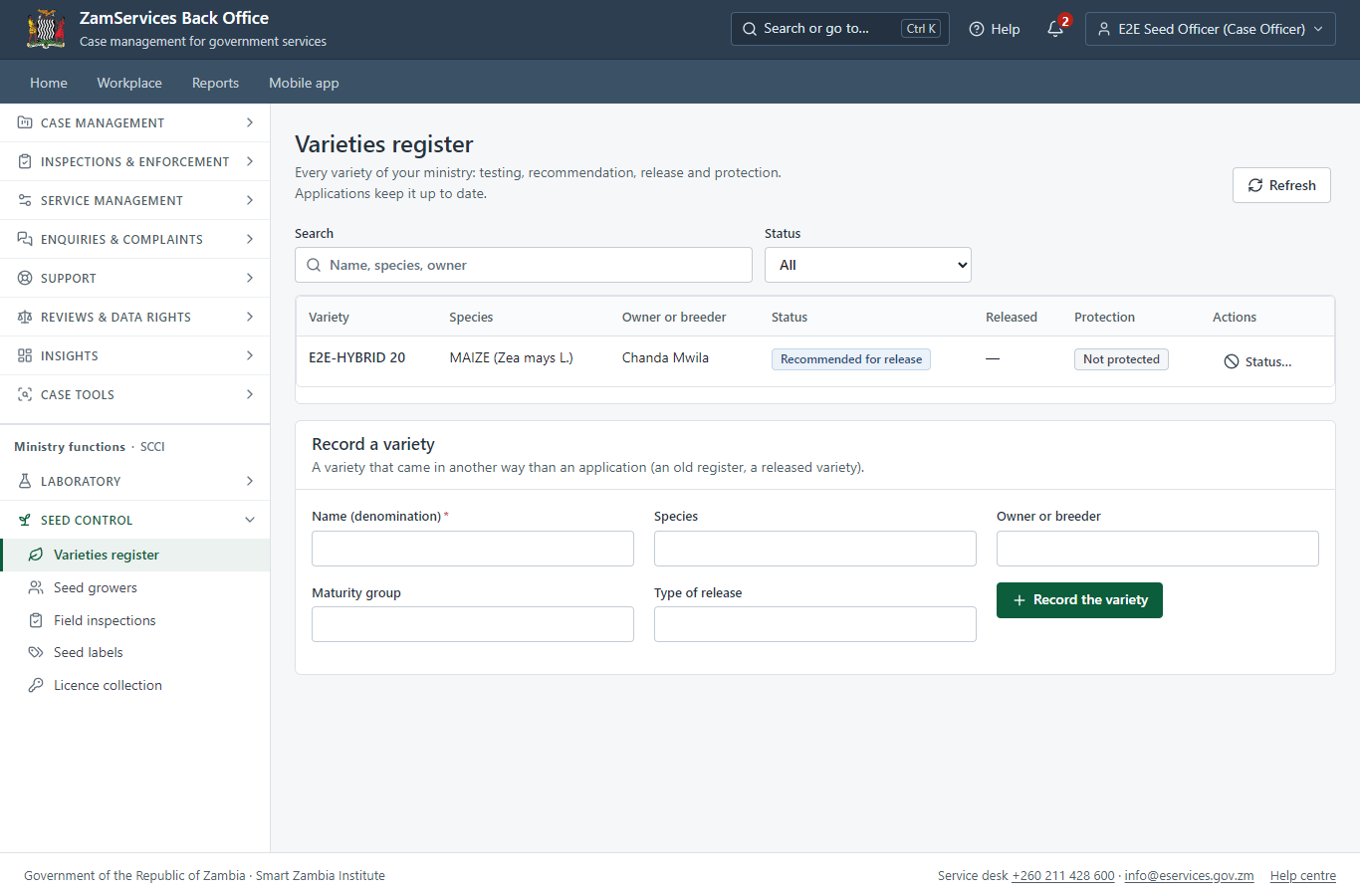
Step 18. The varieties register
Case Officer · Back office
Ministry functions -> Seed control -> Varieties register: the variety is now "Recommended for release". The release application, the protection (with its gazette notice) and the seed growers who multiply it are recorded against it in the same register.
3. Payment
| Item | In the test run |
|---|---|
| Application fee | ZMW 20.00, invoice 6262293679298076, paid with the application (as the legacy service did) |
| Laboratory quotation | ZMW 300.00: the fees of the planned DUS (150.00) and VCU (150.00) tests, proposed by the officer, approved by an Accountant, invoice 6306355005375890 |
| Paid through | ZamPay (the ZamPay test double in this run) |
| Rule | The quotation is never approved by the officer who proposed it; the case waits at "Check the laboratory quotation is paid" until every invoice is paid |
On screen: step 9 (Pay the application fee), step 13 (Approve the laboratory quotation) in section 2.
4. Output documents
DUS report LR-SCCI-2026-1 (laboratory report, PDF)
The laboratory report signed by a lead officer of the laboratory: the sample, the results of each test frozen as they were signed, the conclusion, who signed and when, and the seal. It is a case document for the deciding officers (internal; an officer may release it to the applicant). The download is checked against the hash recorded when it was signed.
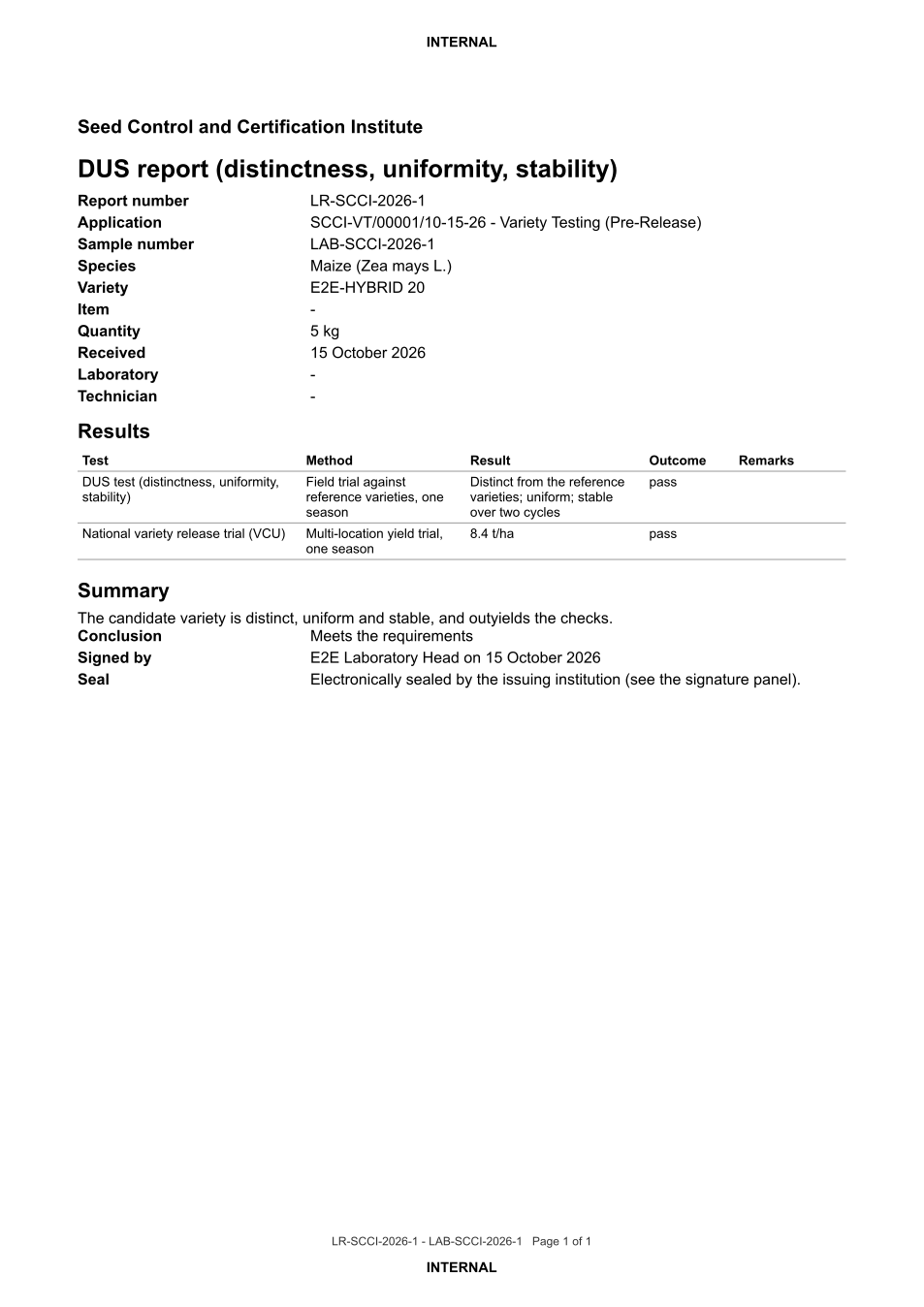
The issued PDF has 1 page; the image shows the first.
Fields
| Field | Value in the test run |
|---|---|
| Report number | LR-SCCI-2026-1 |
| Sample | LAB-SCCI-2026-1 |
| Variety | E2E-HYBRID 20 |
| Tests | DUS: distinct, uniform, stable (pass); VCU: 8.4 t/ha (pass) |
| Conclusion | Meets the requirements |
Seal
| Item | Detail |
|---|---|
| Seal | Electronically sealed (PAdES) by the platform's signing service |
Verification
| Item | Detail |
|---|---|
| Integrity | SHA-256 recorded at signing; the download is refused if the stored file does not match |
On screen: step 18 (The varieties register) in section 2.
5. Notifications
| When | Channel | To | Message | Delivery |
|---|---|---|---|---|
| Application received | in-app (portal bell) | the applicant | Application SCCI-VT/00001/10-15-26 received - Your application SCCI-VT/00001/10-15-26 for Variety Testing (Pre-Release) has been received by Seed Control and Certification Institute. | shown |
| Status changed | in-app (portal bell) | the applicant | Update on application SCCI-VT/00001/10-15-26 - SCCI-VT/00001/10-15-26 (Variety Testing (Pre-Release)) is now: With the office - fees being worked out. | shown |
| Payment due (invoice raised) | in-app (portal bell) | the applicant | Payment due for application SCCI-VT/00001/10-15-26 - The fee of ZMW 20.00 for Variety Testing (Pre-Release) (SCCI-VT/00001/10-15-26) is now due. Invoice 6262293679298076. | shown |
| Payment received | in-app (portal bell) | the applicant | Payment received for SCCI-VT/00001/10-15-26 - Your payment of ZMW 20.00 for SCCI-VT/00001/10-15-26 (Variety Testing (Pre-Release)) has been received. Receipt: <ZamPay>/pdf?documentType=receipt&invoiceNumber=6262293679298076 | shown |
| fee.approval_requested | in-app (portal bell) | the applicant | Fee to approve on SCCI-VT/00001/10-15-26 - Hello E2E Seed Accountant, E2E Seed Officer proposed a fee of ZMW 300.00 on case SCCI-VT/00001/10-15-26 (Variety Testing (Pre-Release)). Approve or refuse it in the back office: <back office>/finance/fee-approvals | shown |
| fee.decided | in-app (portal bell) | the applicant | Fee on SCCI-VT/00001/10-15-26 approved - Hello E2E Seed Officer, the fee of ZMW 300.00 you proposed on case SCCI-VT/00001/10-15-26 (Variety Testing (Pre-Release)) was approved. Note: Fees as per the test types Open the case: <back office>/cases/baa8e331-1fc5-4750-8851-a0e54d1f64fb | shown |
| Payment received | in-app (portal bell) | the applicant | Payment received for SCCI-VT/00001/10-15-26 - Your payment of ZMW 300.00 for SCCI-VT/00001/10-15-26 (Variety Testing (Pre-Release)) has been received. Receipt: <ZamPay>/pdf?documentType=receipt&invoiceNumber=6306355005375890 | shown |
| Licence / permit issued | in-app (portal bell) | the applicant | Your Variety Testing (Pre-Release) document has been issued - SCCI-VTPR-2026-00001 has been issued for Variety Testing (Pre-Release) and is valid until 15/10/2027. | shown |
| Invitation to rate the service | in-app (portal bell) | the applicant | How was Variety Testing (Pre-Release)? - How was Variety Testing (Pre-Release)? Tell us in about a minute. | shown |
| Decision: approved | in-app (portal bell) | the applicant | Application SCCI-VT/00001/10-15-26 completed - SCCI-VT/00001/10-15-26 (Variety Testing (Pre-Release)) is complete. Your documents are ready. | shown |
| Application received | sms | +260 97* *** 567 | Application SCCI-VT/00001/10-15-26 for Variety Testing (Pre-Release) has been received. Track it: <portal>/my-workplace | delivered |
| Application received | e2e.c***@example.test | Application SCCI-VT/00001/10-15-26 received | skipped | |
| Status changed | sms | +260 97* *** 567 | delivered | |
| Payment due (invoice raised) | sms | +260 97* *** 567 | Fee of ZMW 20.00 due for SCCI-VT/00001/10-15-26. Invoice 6262293679298076. Pay: <ZamPay>/pay-for-service/get-invoice/6262293679298076 | delivered |
| Payment due (invoice raised) | e2e.c***@example.test | Payment due for application SCCI-VT/00001/10-15-26 | skipped | |
| Payment received | sms | +260 97* *** 567 | delivered | |
| fee.approval_requested | e2e.s***@example.test | Fee to approve on SCCI-VT/00001/10-15-26 | skipped | |
| Payment due (invoice raised) | sms | +260 97* *** 567 | Your payment of ZMW 20.00 for application SCCI-VT/00001/10-15-26 (Variety Testing (Pre-Release)) has been received. Receipt: <ZamPay>/pdf?documentType=receipt&invoiceNumber=6262293679298076 Processing continues. | delivered |
| fee.decided | e2e.s***@example.test | Fee on SCCI-VT/00001/10-15-26 approved | skipped | |
| Invitation to rate the service | sms | +260 97* *** 567 | skipped | |
| Invitation to rate the service | e2e.c***@example.test | How was Variety Testing (Pre-Release)? | skipped | |
| Decision: approved | e2e.c***@example.test | Application SCCI-VT/00001/10-15-26 completed | skipped | |
| Licence / permit issued | sms | +260 97* *** 567 | delivered | |
| Licence / permit issued | e2e.c***@example.test | Your Variety Testing (Pre-Release) document has been issued | skipped | |
| Decision: approved | sms | +260 97* *** 567 | delivered |
Delivery: shown = in the portal's notification bell; delivered = the SMS gateway (a test double in this run) reported the text delivered; skipped = not sent on that channel (e-mail is not configured on the test installation, and some notices go out on one channel only); sent by the national portal = a ministry node handed the notice to the national portal, which texts and e-mails the citizen under its own name and the citizen's preferences. Addresses written <portal>, <ZamPay> stand for the national portal and ZamPay.
6. Legacy mapping
| Item | Detail |
|---|---|
| Replaces | Variety Testing (Pre-Release) in the legacy ZIGS e-Services directory (ZIGS_Services) |
| Legacy service id | 250 |
| Legacy provider | Seed Control and Certification Institute (SCCI) under Ministry of Agriculture |
| Legacy process | VarietyTesting (process 128) |
| Fee in the legacy system | Pre-Release fee per Application (if the case is for first season of testing only): USD 20 (New) DUS Testing fee per variety per year: USD 150 (New) National Variety Release Trials fee per variety per site per year: USD 150 (New) |
| Fee taken before submission | yes (as in ZIGS) |
| Time to issue (legacy) | New: 24 months |
| Legacy output templates | Notice of Action: ZIGS_Forms_Notices / GS-2.NoticeOfAction Application form: ZIGS_Forms_SCCI / SCCI_VarietyTesting.Application GF-1 Treasury Invoice: ZIGS_CustomForms / GF-1 Invoice GF-2 Treasury Receipt: ZIGS_CustomForms / GF-2 Receipt |
| Legacy address | none recorded |
| How it was brought over | Imported by the platform's legacy catalogue importer (zcm-backend scripts/zigs/importLegacy.js) from the ZIGS snapshot: form, case types, fees, documents, process and output templates, then served by the new platform. |
7. Version and date
| Item | Detail |
|---|---|
| Document version | service v1, platform 9e8768d3 |
| Generated | 2026-10-15T21:19:50Z (by the end-to-end run, not edited by hand) |
| Service version | not versioned (configured directly) |
| Platform snapshot | backend 9e8768d3 portal b47ff71 back office 548d2d6 |
| Test suite | e2e ca5e2ed; one installation (combined); seed profile mihud |
| Journeys | 20-seed-variety-samples.spec.js: citizen finds the service and applies for a variety test - passed 20-seed-variety-samples.spec.js: the SCCI officer takes it on and works out the application fee - passed 20-seed-variety-samples.spec.js: citizen pays the application fee - passed 20-seed-variety-samples.spec.js: the officer registers the sample, plans the tests and asks finance for the quotation - passed 20-seed-variety-samples.spec.js: the quotation: approved by an Accountant (not by its proposer), the step approved, the citizen pays - passed 20-seed-variety-samples.spec.js: the Laboratory step holds until the report is signed; results, then the signature of an officer who recorded none - passed 20-seed-variety-samples.spec.js: the variety committee meets and approves; the case is completed and the variety recommended for release - passed 20-seed-variety-samples.spec.js: the signed laboratory report: downloaded, its fields and seal - passed |
| Result | 8 of 8 journey tests passed |
| Data | Synthetic test data on a local test installation; provider test doubles for ZamPass, ZamPay, SMS and signing. |