
Forestry Tree Felling Permit
| Form | Workflow | Outputs | E2E test | Docs |
|---|---|---|---|---|
| Passed | Passed | Passed | Passed | Passed |
- End-to-end test
- 6/6 passed 2026-10-21 (mihud, combined)
- Documentation
- 22 steps, 10 images · Download the DOCX
- Who can apply
- Individual, Organization
- Catalogue ID
- 157
Required documents
- Title Deeds or Lease Agreements, or Consent Letter from Traditional Authority/Leader in the case of Customary Land (New)
- Cover Letter to the Director Forestry (New)
- National Registration Card (NRC) (New)
- Certificate of Incorporation / ZDA (if company, church, society) (New)
Output documents
- Application form (application)
- Certificate (certificate)
- GS-2 Notice of Government Action (notice-of-action)
Test evidence
Forestry Tree Felling Permit
Service documentation · Republic of Zambia · GSB e-Services
| Owner | Forestry Department |
| Service key | MGEE/tree-felling-permit |
| Version | service v1, platform 86947eee |
| Date | 2026-10-21 |
Generated automatically by the service's end-to-end test run. Every screenshot shows synthetic test data on a local test installation, never real personal data.
This document describes the Forestry Tree Felling Permit service of Forestry Department as the platform runs it today. It is generated by the service's end-to-end test: every step below was performed by the test, and every screenshot was taken during that run with synthetic data. Regenerate it with npm run docs:services in the e2e suite; do not edit it by hand.
1. Service summary
| Item | Detail |
|---|---|
| Service | Forestry Tree Felling Permit |
| Owner (MDA) | Forestry Department (MGEE) |
| Purpose | The Forestry Tree Felling Permit is a document that allows the holder to fell and cut down trees. |
| Who can apply | Individual; Organization |
| How to apply | Online on the national e-Services portal, signed in with ZamPass; pay with ZamPay. |
| Fees | Fee set by the office: (variable) |
| Turnaround | 30 days |
| Validity of the output | 14 days |
| Required documents | Title Deeds or Lease Agreements, or Consent Letter from Traditional Authority/Leader in the case of Customary Land (required) National Registration Card (NRC) (required) Cover Letter to the Director Forestry (required) Certificate of Incorporation / ZDA (if company, church, society) (required) |
| Output documents | Forestry Tree Felling Permit Approval letter Application form GS-2 Notice of Government Action |
| Legal basis | The Forest Act No. 4 of 2015 (http://www.parliament.gov.zm/node/4535) SI No. 94 of 2015 (https://pmrczambia.com/the-forest-export-of-timber-regulations-2015-statutory-instrument-no-94-of-2015/) SI No. 52 of 2013 (http://extwprlegs1.fao.org/docs/pdf/zam133574.pdf) |
2. Application process, step by step
The process as configured in the back office:
| Step | Role | Task | Type |
|---|---|---|---|
| 1 | Applicant | Apply | form |
| 2 | System | Generate Document | generate-document |
| 3 | Case Officer | Review | review |
| 4 | Case Officer | Field Validation | forestry-field-validation |
| 5 | Supervisor | Review | review |
| 6 | Executive | Approve | approve |
| 7 | Applicant | Payment | payment |
| 8 | Case Officer | Verify Payment | verify-payment |
| 9 | Executive | Decision | decision |
| 10 | System | Generate Document | generate-document |
| 11 | System | Notify Client | notify |
Who takes part in this journey: Citizen, Case Officer, Supervisor, Executive.
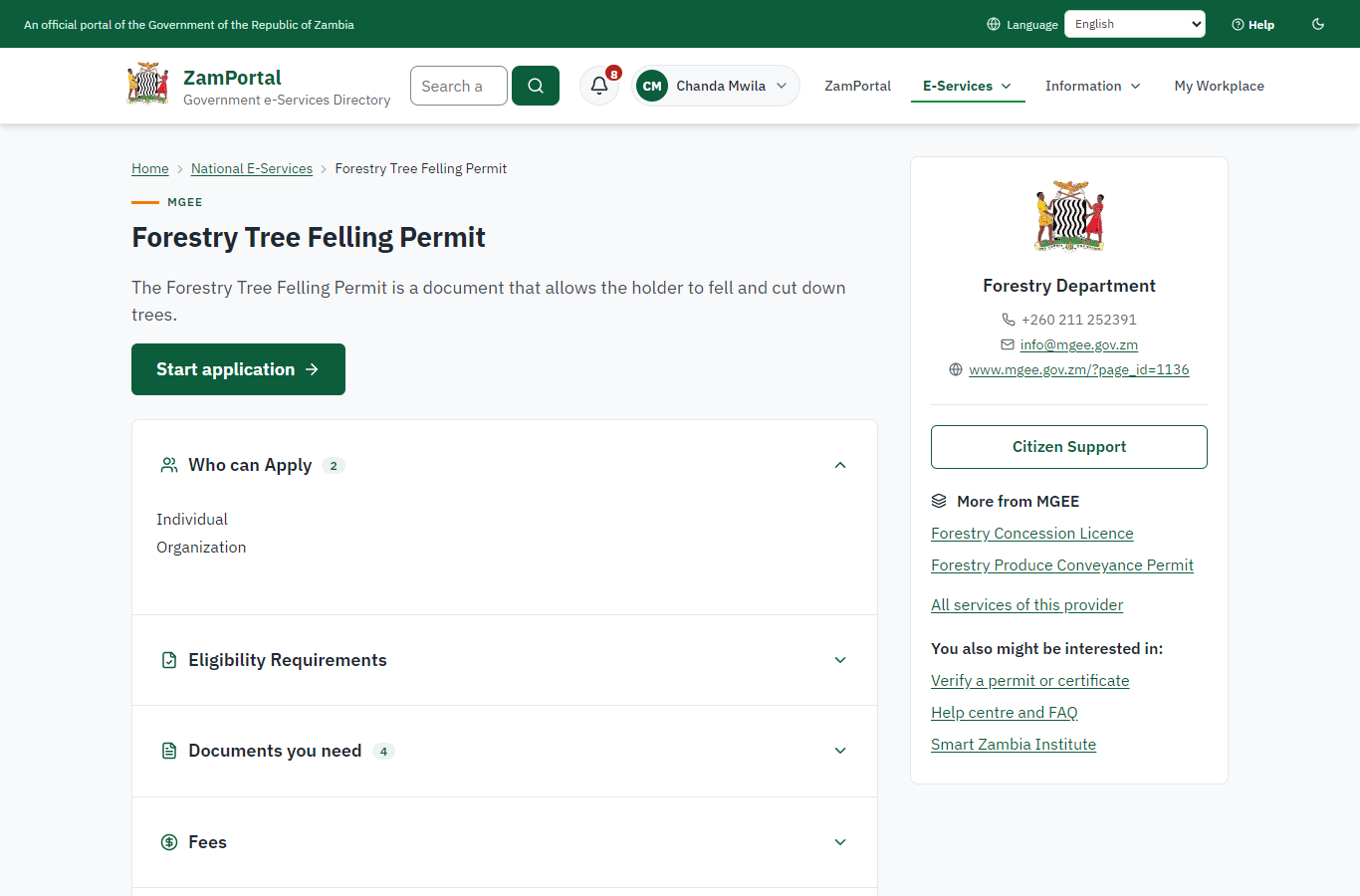
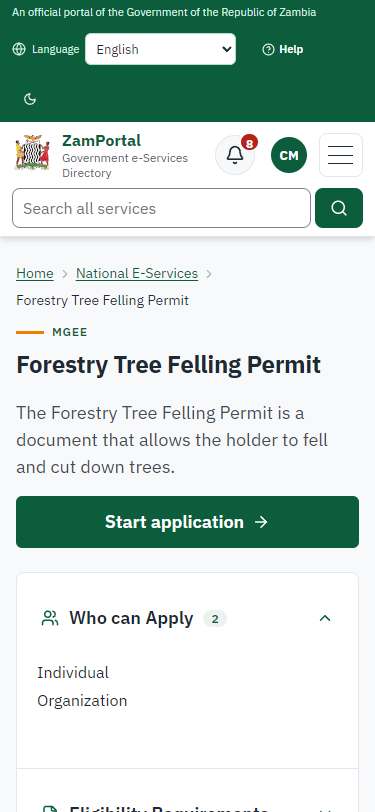
Step 1. Start the felling application, with its map
Citizen · National e-Services portal
The citizen applies with the number of their own concession licence and draws the felling area inside it on the map. A concession held by someone else, or an expired one, is refused.
Step 2. Send the felling application inside the concession
Citizen · National e-Services portal (sent through the API the portal uses in the test run: no screenshot)
The application names the citizen's concession licence and coupe and gives an 800 m x 600 m felling area inside the concession (sent through the API the portal uses: drawing on the map is not automated yet). The platform checks the area lies inside a concession the applicant holds and records the felling site (case MGEE-FTFP/00002/10-22-26 in this run).
Step 3. Take the application on
Case Officer · Back office (done through its case API in the test run: no screenshot)
The Case Officer takes the new application on (assigned to them). The case moves from "Submitted" to "CO Review".
Step 4. Review, Report Findings, Draft Decision
Case Officer · Back office (done through its case API in the test run: no screenshot)
The Case Officer completes "Review, Report Findings, Draft Decision". The case moves from "CO Review" to "CO Field Validation".
Step 5. Field Validation
Case Officer · Back office (done through its case API in the test run: no screenshot)
The Case Officer records the field inspection (outcome: passed) and completes "Field Validation". The case moves from "CO Field Validation" to "SV Review".
Step 6. Review, Add Comments, Send for Signature
Supervisor · Back office (done through its case API in the test run: no screenshot)
The Supervisor completes "Review, Add Comments, Send for Signature". The case moves from "SV Review" to "EX Approve".
Step 7. Review, Inspect, e-Sign Executive
Executive · Back office (done through its case API in the test run: no screenshot)
The Executive completes "Review, Inspect, e-Sign Executive". The case moves from "EX Approve" to "AP Payment".
Step 8. Pay the royalty
Citizen · National e-Services portal (sent through the API the portal uses in the test run: no screenshot)
The royalty is worked out on the server from the expert's tree inventory and invoiced; the citizen pays it with ZamPay (paid through the API in this run).
Step 9. Verify Payment Completion
Case Officer · Back office (done through its case API in the test run: no screenshot)
The Case Officer completes "Verify Payment Completion". The case moves from "CO Verify Payment" to "EX Decision".
Step 10. Review, Inspect, e-Sign Executive
Executive · Back office (done through its case API in the test run: no screenshot)
The Executive decides: approve ("Review, Inspect, e-Sign Executive"). The case moves from "EX Decision" to "Completed".
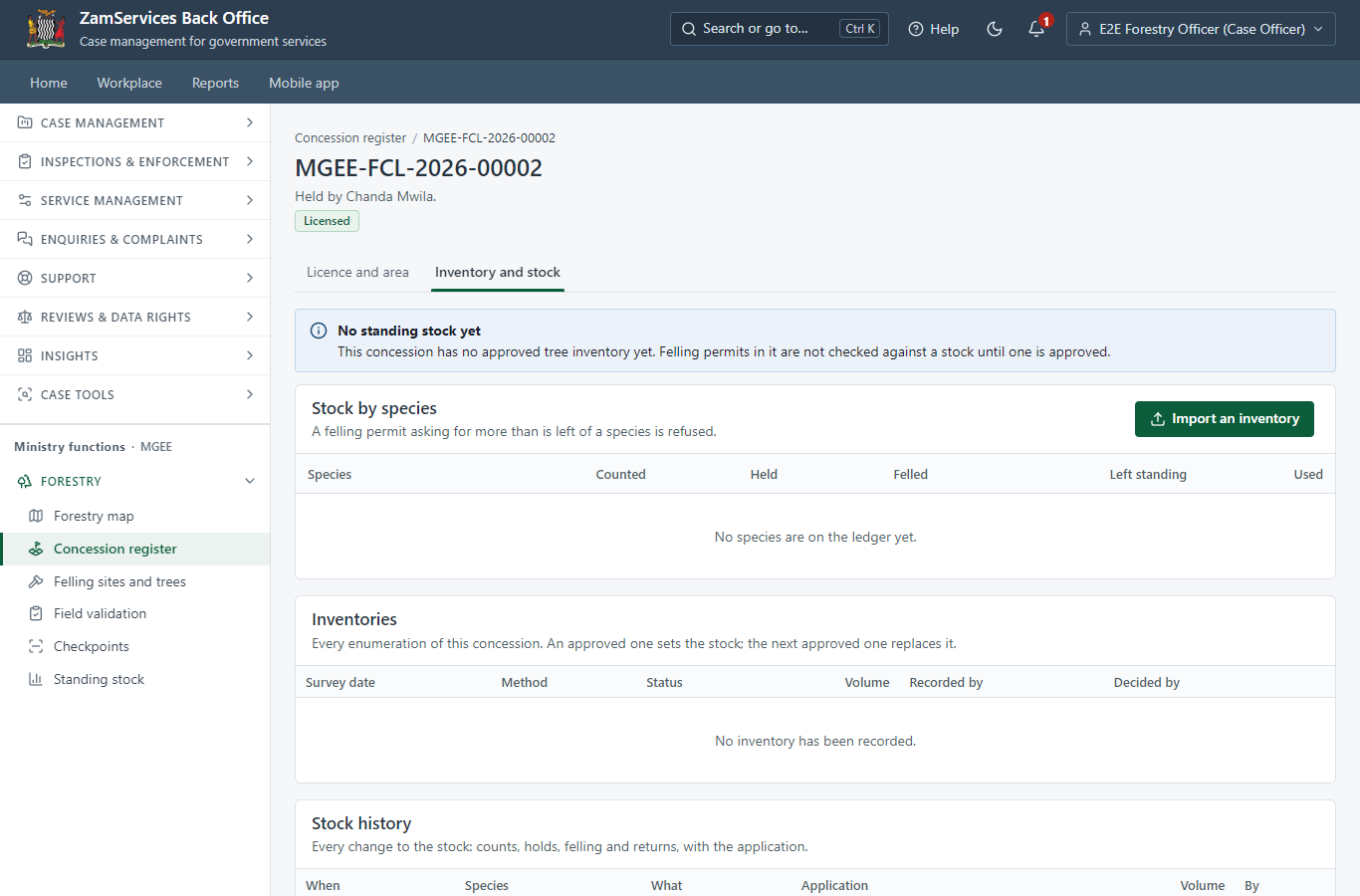
Step 11. The concession has no standing stock yet
Case Officer · Back office
Before the concession is enumerated, felling permits in it are not checked against a stock. The officer opens the concession's Inventory tab to record its tree inventory.
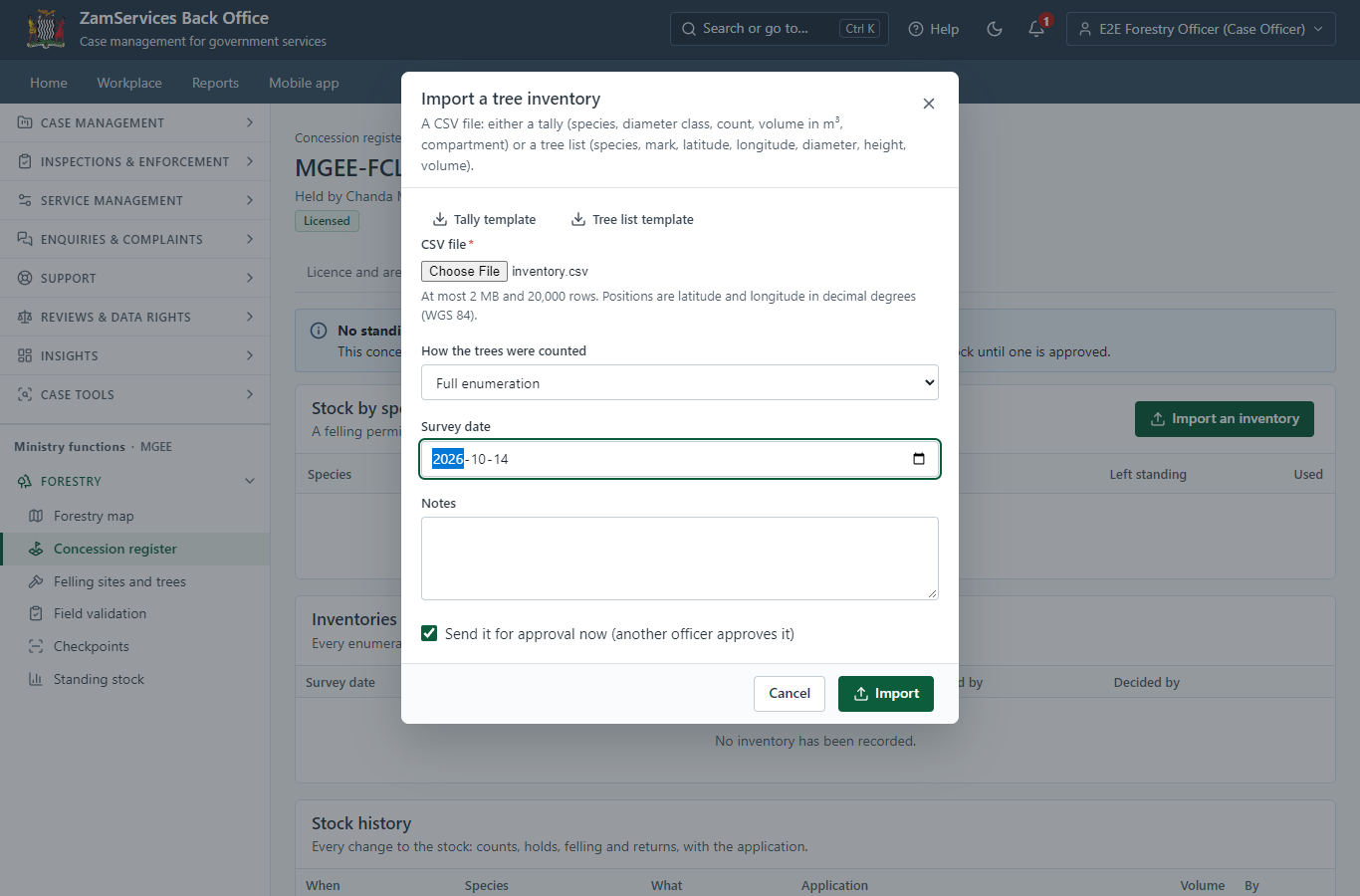
Step 12. Import the tree inventory (CSV)
Case Officer · Back office
A CSV tally per species and diameter class (or a list of trees with their positions). The server checks every row: unknown species, branch-wood, negative numbers and trees outside the concession are refused with the row named.
Step 13. The recording officer cannot approve their own inventory
Case Officer · Back office (done through its case API in the test run: no screenshot)
Approving an inventory sets the standing stock every felling permit draws on, so another officer (a supervisor or executive) must approve it: the server refuses the recording officer (403).
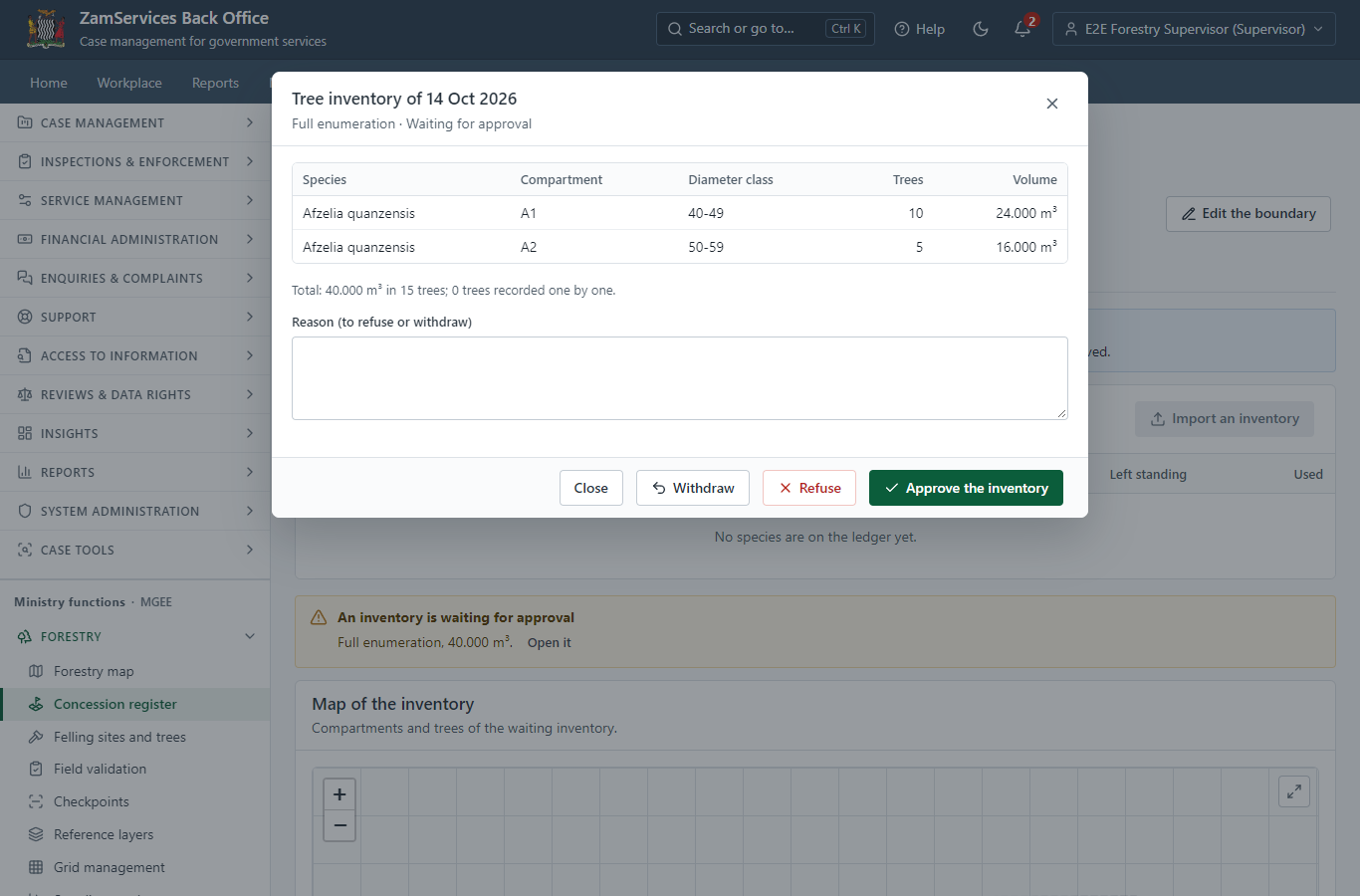
Step 14. Check and approve the inventory
Supervisor · Back office
The supervisor checks the tally (species, compartment, diameter class, trees, volume) and approves it. An inventory recorded or sent by the same officer cannot be approved by them.
Step 15. The standing stock of the concession
Supervisor · Back office
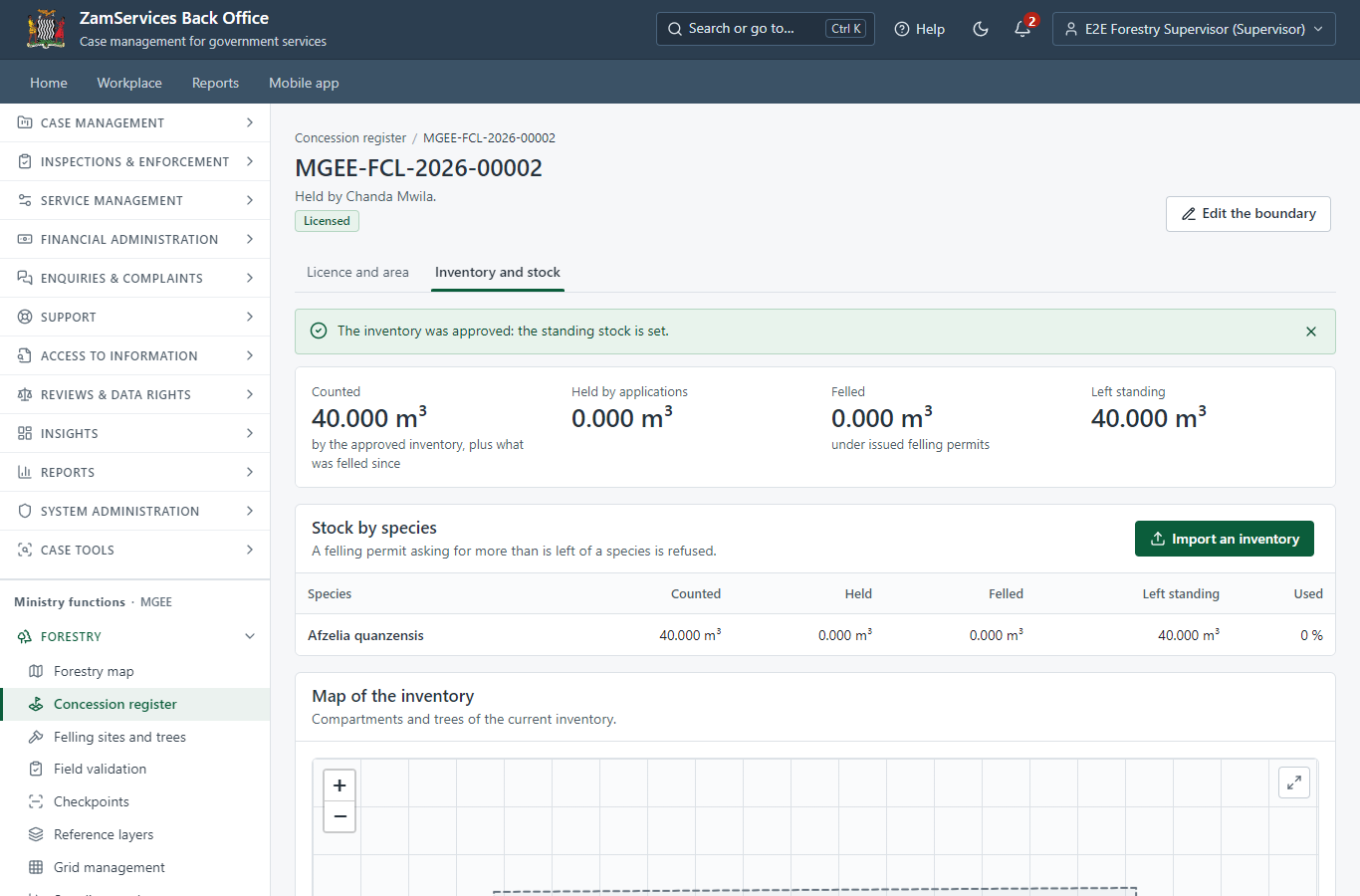
One allowance per species on the platform's allocation ledger: counted, held by applications, felled under issued permits, and left standing.
Step 16. Apply to fell inside an enumerated concession
Citizen · National e-Services portal (sent through the API the portal uses in the test run: no screenshot)
The application names the concession licence (case MGEE-FTFP/00003/10-22-26 in this run). Quantities declared on the form, when there are any, are held against the standing stock at once; here the expert's tree inventory sets them.
Step 17. Field validation holds the felling volume
Case Officer · Back office (done through its case API in the test run: no screenshot)
When the field validation step is completed, the expert's tree inventory (30 m³ of Afzelia quanzensis) is held against the concession's standing stock: 10 m³ are left for other applications.
Step 18. The permit is issued and draws the volume
Executive · Back office (done through its case API in the test run: no screenshot)
When the felling permit MGEE-FTFP-2026-00002 is issued, exactly its tree inventory (30 m³) is drawn from the concession's stock; a retried issue draws nothing more. A refused, withdrawn or lapsed application gives its hold back at once.
Step 19. Over-felling is refused
Case Officer · Back office (done through its case API in the test run: no screenshot)
A second application whose trees (15 m³) exceed what is left standing (10 m³) cannot leave the field validation step: the server refuses it (409 OVER_FELLING), nothing is held, and the officer refuses the application or has the trees re-measured. Two applications racing for the last cubic metres are served one after the other.
Step 20. A felling permit against the concession stock
Case Officer · Back office
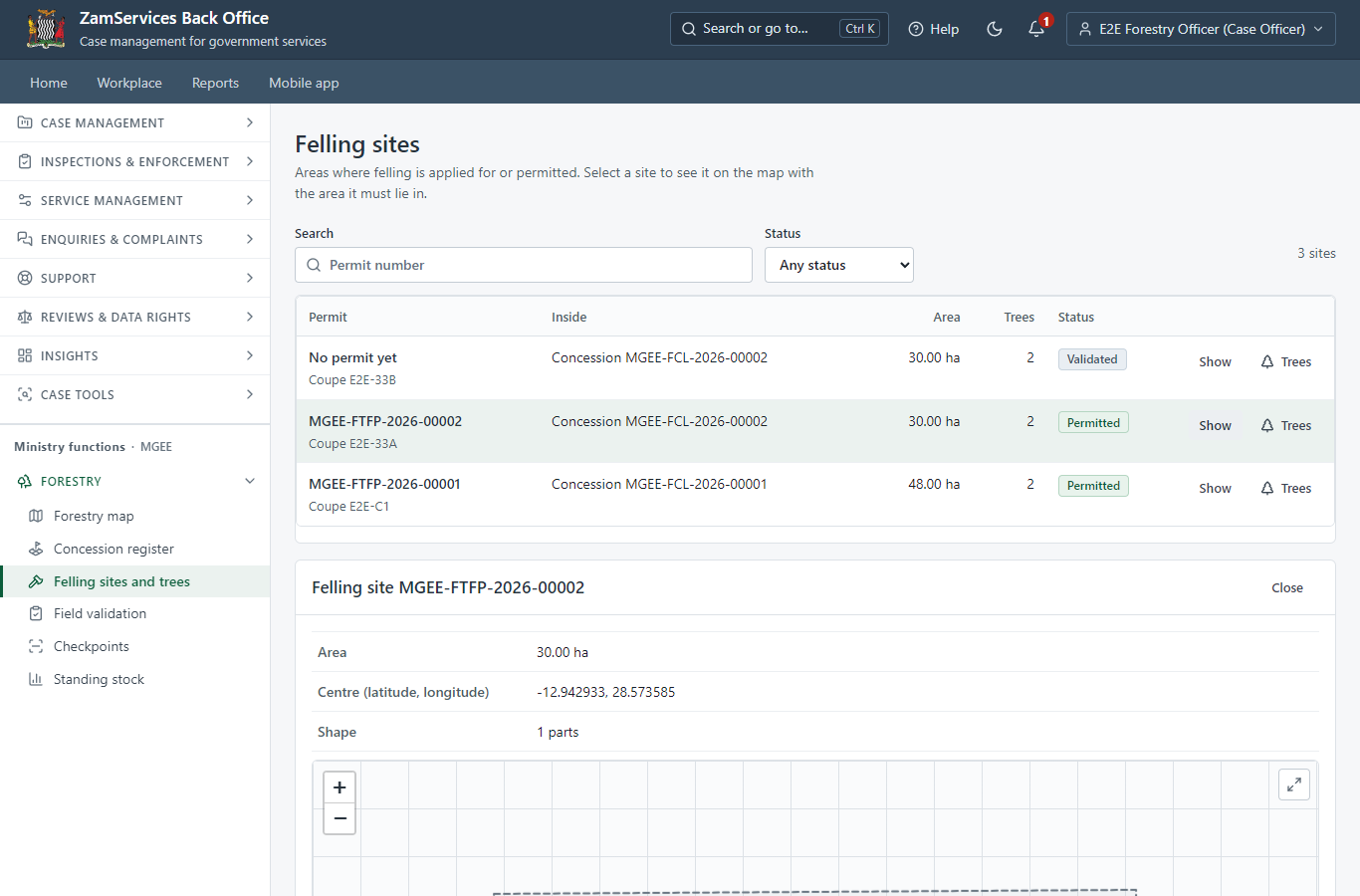
Each felling site shows what its permit holds or has drawn from the concession's standing stock, and what is left there.
Step 21. The stock history of the concession
Case Officer · Back office
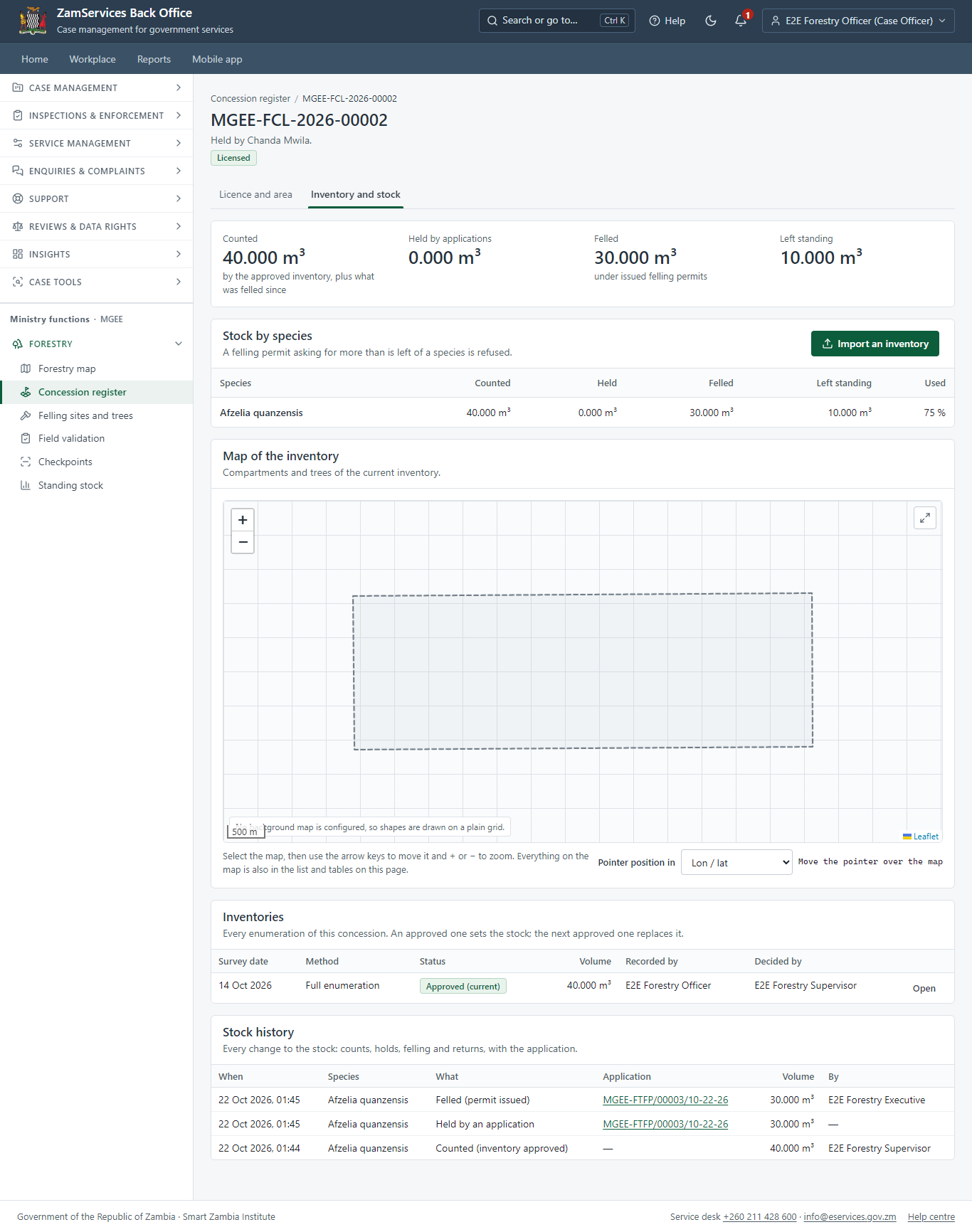
Every movement of the stock with its application: the count, the hold at validation, the draw at issue (and any release).
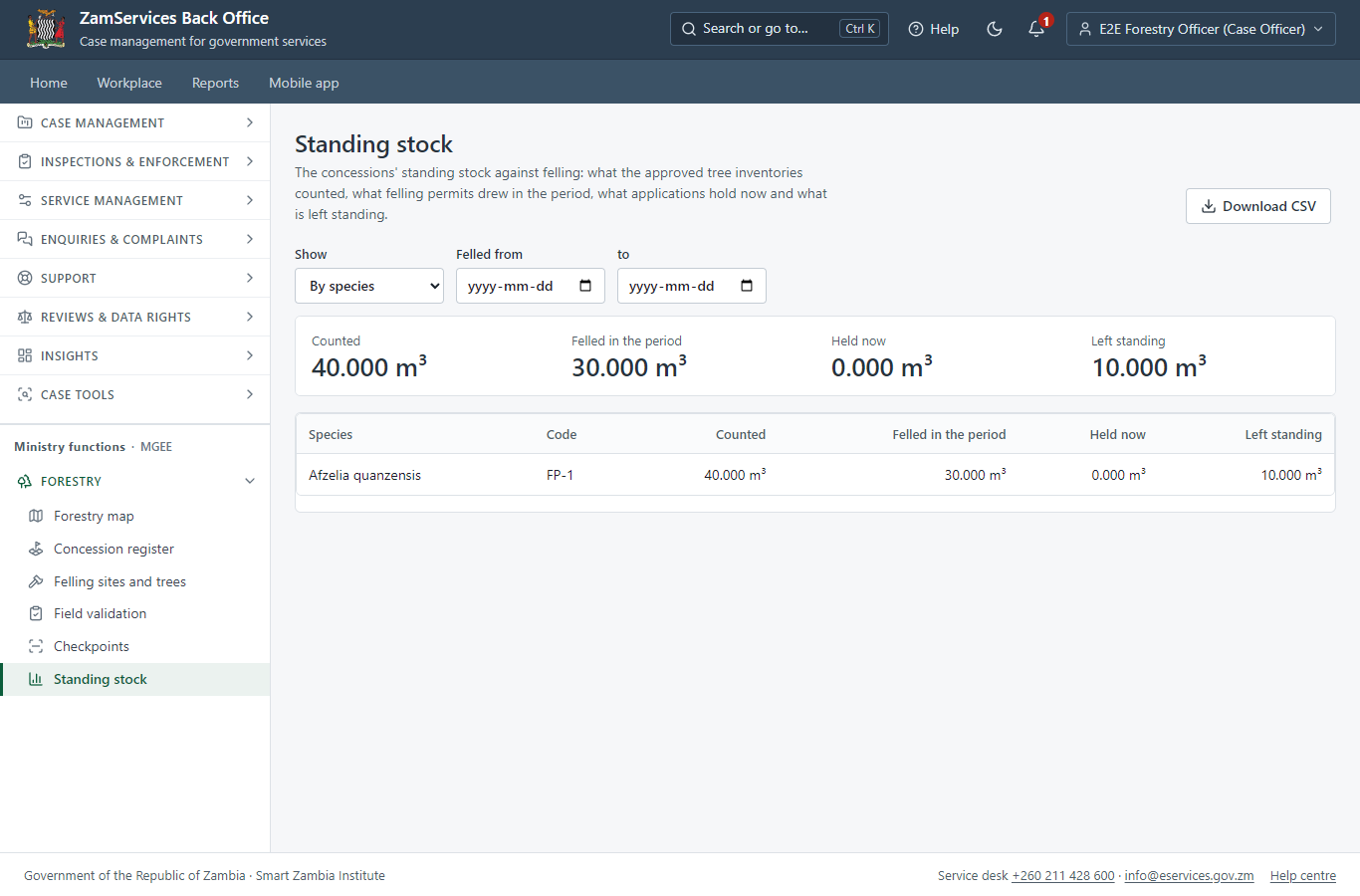
Step 22. Standing stock against felling (report)
Supervisor · Back office
By species or by concession, for a period: counted, felled in the period, held now and left standing; downloadable as CSV.
3. Payment
| Item | In the test run |
|---|---|
| Royalty | ZMW 5,400.00 in this run: 10 m³ x ZMW 460 (the species rate) + branch-wood 10 m³ x ZMW 80, from the expert's tree inventory |
| When it is paid | After the approval |
| Invoice number | 5714015329009546 |
| Paid through | ZamPay (the ZamPay test double in this run) |
On screen: step 8 (Pay the royalty) in section 2.
4. Output documents
Forestry Tree Felling Permit (sealed PDF)
The FDMS felling permit: concession licence number, coupe, the royalty table per species with the branch-wood lines, the amount in words and the conditions; valid 14 days. Its timber becomes the allowance conveyance permits draw on.
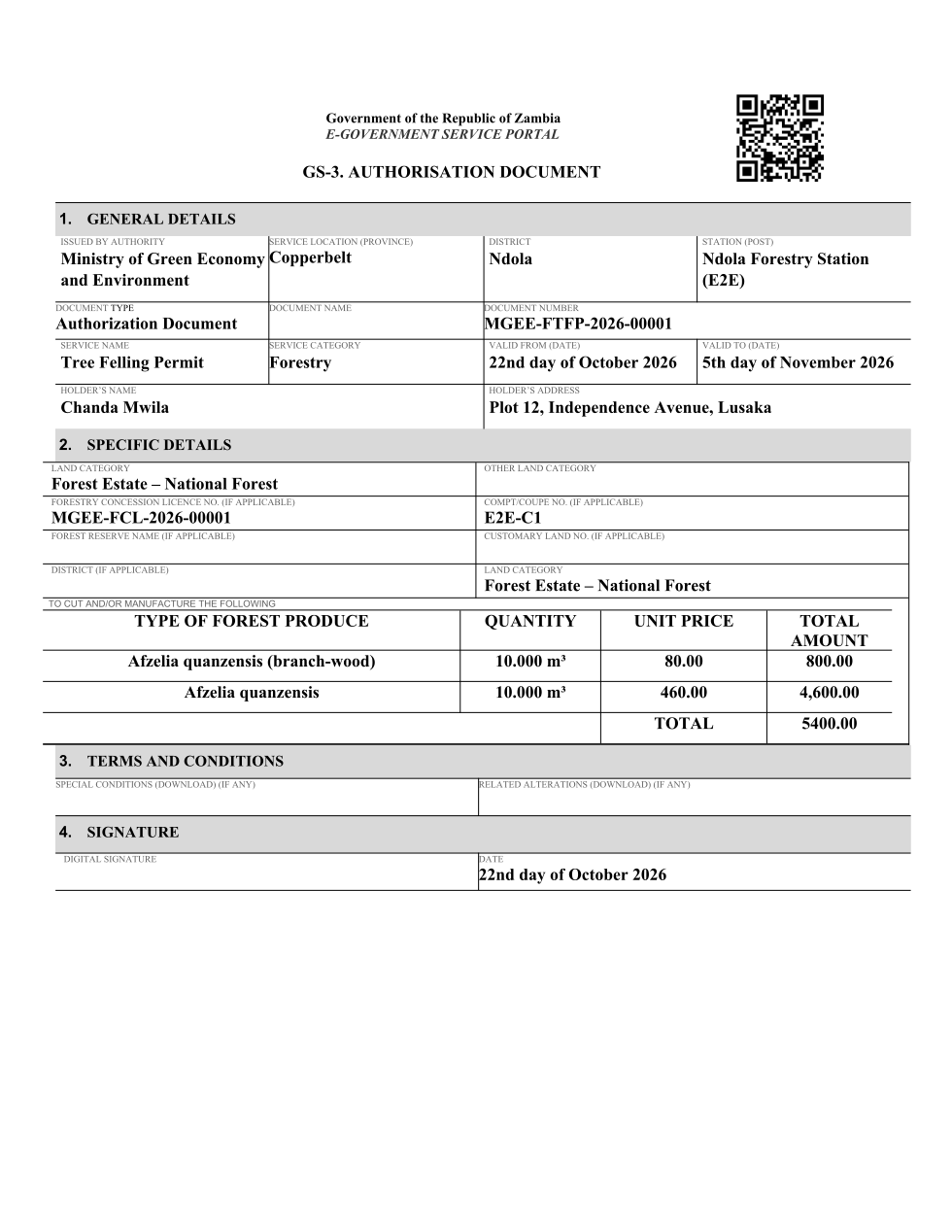
The issued PDF has 3 pages; the image shows the first.
Fields
| Field | Value in the test run |
|---|---|
| Document title | Forestry Tree Felling Permit |
| Permit / licence number | MGEE-FTFP-2026-00001 |
| Holder | Chanda Mwila |
| Valid from | 2026-10-21 |
| Valid until | 2026-11-04 |
| Status | active |
| Verification code (printed with a QR code) | Y2SF-YD2T-QD |
Seal
| Item | Detail |
|---|---|
| Seal status | sealed |
| Signature level | PAdES-B-T |
| Sealed by | the platform seal (development key in the test run) |
| Signed at | 2026-10-21T23:44:01.135Z |
| Trusted time-stamp | 2026-10-21T23:44:01.113Z (time-stamping authority) |
| Document fingerprint (SHA-256) | 577063e468132b3f... |
Verification
| Item | Detail |
|---|---|
| Where | The public verification page of the national portal, <portal>/verify/<verification code>, opened by scanning the QR code on the document. |
| What it shows | Whether the document is genuine and current, its holder and validity, and whether the electronic seal is valid and who sealed it. |
| Checking a copy | Anyone can upload a PDF they were given; the page says whether it is exactly the document that was issued. A changed copy is reported as not matching. |
5. Notifications
| When | Channel | To | Message | Delivery |
|---|---|---|---|---|
| Application received | in-app (portal bell) | the applicant | Application MGEE-FTFP/00002/10-22-26 received - Your application MGEE-FTFP/00002/10-22-26 for Forestry Tree Felling Permit has been received by Forestry Department. | shown |
| Status changed | in-app (portal bell) | the applicant | Update on application MGEE-FTFP/00002/10-22-26 - MGEE-FTFP/00002/10-22-26 (Forestry Tree Felling Permit) is now: With the office - being reviewed. | shown |
| Payment due (invoice raised) | in-app (portal bell) | the applicant | Payment due for application MGEE-FTFP/00002/10-22-26 - The fee for Forestry Tree Felling Permit (MGEE-FTFP/00002/10-22-26) is now due. | shown |
| Payment due (invoice raised) | in-app (portal bell) | the applicant | Payment due for application MGEE-FTFP/00002/10-22-26 - The fee of ZMW 5400.00 for Forestry Tree Felling Permit (MGEE-FTFP/00002/10-22-26) is now due. Invoice 5714015329009546. | shown |
| Payment received | in-app (portal bell) | the applicant | Payment received for MGEE-FTFP/00002/10-22-26 - Your payment of ZMW 5400.00 for MGEE-FTFP/00002/10-22-26 (Forestry Tree Felling Permit) has been received. Receipt: <ZamPay>/pdf?documentType=receipt&invoiceNumber=5714015329009546 | shown |
| Licence / permit issued | in-app (portal bell) | the applicant | Your Forestry Tree Felling Permit document has been issued - MGEE-FTFP-2026-00001 has been issued for Forestry Tree Felling Permit and is valid until 05/11/2026. | shown |
| Invitation to rate the service | in-app (portal bell) | the applicant | How was Forestry Tree Felling Permit? - How was Forestry Tree Felling Permit? Tell us in about a minute. | shown |
| Decision: approved | in-app (portal bell) | the applicant | Application MGEE-FTFP/00002/10-22-26 completed - MGEE-FTFP/00002/10-22-26 (Forestry Tree Felling Permit) is complete. Your documents are ready. | shown |
| Application received | e2e.c***@example.test | Application MGEE-FTFP/00002/10-22-26 received | skipped | |
| Application received | sms | +260 97* *** 567 | Application MGEE-FTFP/00002/10-22-26 for Forestry Tree Felling Permit has been received. Track it: <portal>/my-workplace | delivered |
| Status changed | sms | +260 97* *** 567 | delivered | |
| Payment due (invoice raised) | sms | +260 97* *** 567 | Fee due for MGEE-FTFP/00002/10-22-26. Pay: <portal>/my-workplace | delivered |
| Payment due (invoice raised) | e2e.c***@example.test | Payment due for application MGEE-FTFP/00002/10-22-26 | skipped | |
| Payment due (invoice raised) | sms | +260 97* *** 567 | Fee of ZMW 5400.00 due for MGEE-FTFP/00002/10-22-26. Invoice 5714015329009546. Pay: <ZamPay>/pay-for-service/get-invoice/5714015329009546 | delivered |
| Payment received | sms | +260 97* *** 567 | delivered | |
| Invitation to rate the service | sms | +260 97* *** 567 | skipped | |
| Invitation to rate the service | e2e.c***@example.test | How was Forestry Tree Felling Permit? | skipped | |
| Licence / permit issued | sms | +260 97* *** 567 | delivered | |
| Decision: approved | sms | +260 97* *** 567 | delivered | |
| Decision: approved | e2e.c***@example.test | Application MGEE-FTFP/00002/10-22-26 completed | skipped | |
| Licence / permit issued | e2e.c***@example.test | Your Forestry Tree Felling Permit document has been issued | skipped |
Delivery: shown = in the portal's notification bell; delivered = the SMS gateway (a test double in this run) reported the text delivered; skipped = not sent on that channel (e-mail is not configured on the test installation, and some notices go out on one channel only); sent by the national portal = a ministry node handed the notice to the national portal, which texts and e-mails the citizen under its own name and the citizen's preferences. Addresses written <portal>, <ZamPay> stand for the national portal and ZamPay.
6. Legacy mapping
| Item | Detail |
|---|---|
| Replaces | Forestry Tree Felling Permit in the legacy ZIGS e-Services directory (ZIGS_Services) |
| Legacy service id | 157 |
| Legacy provider | Forestry Department (MGEE) under Ministry of Green Economy and Environment |
| Legacy process | LicenseReview (process 9) |
| Fee in the legacy system | none |
| Fee taken before submission | yes (as in ZIGS) |
| Time to issue (legacy) | New: 30 calendar days |
| Legacy output templates | Forestry Tree Felling Permit: ZIGS_Forms_MGEE / MGEE_ForestryTreeFellingPermit.Certificate Approval letter: ZIGS_Forms_MGEE / MGEE_ForestryTreeFellingPermit.ApprovalLetter Application form: ZIGS_Forms_MGEE / MGEE_ForestryTreeFellingPermit.Application GS-2 Notice of Government Action: ZIGS_Forms_Notices / GS-2.NoticeOfAction |
| Legacy address | none recorded |
| How it was brought over | Imported by the platform's legacy catalogue importer (zcm-backend scripts/zigs/importLegacy.js) from the ZIGS snapshot: form, case types, fees, documents, process and output templates, then served by the new platform. |
7. Version and date
| Item | Detail |
|---|---|
| Document version | service v1, platform 86947eee |
| Generated | 2026-10-21T23:45:55Z (by the end-to-end run, not edited by hand) |
| Service version | published version 1 |
| Platform snapshot | backend 86947eee portal 8d4a375 back office 8b37374 |
| Test suite | e2e f4407ea; one installation (combined); seed profile mihud |
| Journeys | 16-forestry-felling-conveyance.spec.js: citizen: applies to fell inside their concession; another applicant naming it is refused - passed 16-forestry-felling-conveyance.spec.js: officers: review, the expert records the trees, approval; the citizen pays the royalty; the permit is issued - passed 16-forestry-felling-conveyance.spec.js: citizen: conveys timber from the felling permit; the ledger holds it, an excess is flagged - passed 33-forestry-concession-inventory.spec.js: officers: the concession tree inventory is imported, and approved by another officer - passed 33-forestry-concession-inventory.spec.js: citizen and officers: a felling permit holds 30 m³ at validation and draws it at issue - passed 33-forestry-concession-inventory.spec.js: citizen: a second felling above what is left is refused at the field validation - passed |
| Result | 6 of 6 journey tests passed |
| Data | Synthetic test data on a local test installation; provider test doubles for ZamPass, ZamPay, SMS and signing. |