
Building Permit
| Form | Workflow | Outputs | E2E test | Docs |
|---|---|---|---|---|
| Passed | Passed | Passed | Passed | Passed |
- End-to-end test
- 7/7 passed 2026-10-22 (mihud, combined)
- Documentation
- 13 steps, 44 images · Download the DOCX
- Who can apply
- Organization, Individual
- Catalogue ID
- 647
Output documents
- GS-3 Authorization Document (certificate)
- GS-1 Application for a Government Service (application)
- GS-2 Notice of Government Action (notice-of-action)
Test evidence
Building Permit
Service documentation · Republic of Zambia · GSB e-Services
| Owner | Department of Local Government |
| Service key | LGD/building-permit |
| Version | service v1, platform a4ce8843 |
| Date | 2026-10-22 |
Generated automatically by the service's end-to-end test run. Every screenshot shows synthetic test data on a local test installation, never real personal data.
This document describes the Building Permit service of Department of Local Government as the platform runs it today. It is generated by the service's end-to-end test: every step below was performed by the test, and every screenshot was taken during that run with synthetic data. Regenerate it with npm run docs:services in the e2e suite; do not edit it by hand.
1. Service summary
| Item | Detail |
|---|---|
| Service | Building Permit |
| Owner (MDA) | Department of Local Government (LGD) |
| Purpose | This permit is issued by a planning authority to individuals and organizations seeking to undertake construction or make significant changes to buildings (and affected land), ensuring the project aligns with approved spatial plans, zoning laws, safety standards, and promotes orderly urban development according to the Urban and Regional Planning Act of 2015. |
| Who can apply | Organization; Individual |
| How to apply | Online on the national e-Services portal, signed in with ZamPass; pay with ZamPay. |
| Fees | Application and permit fees: (table) Plan scrutiny fee (by floor area): (table) Plan scrutiny fee (by floor area) (renewal): (table) Plan scrutiny fee (by site area): (table) Plan scrutiny fee (by building perimeter): (table) Plan scrutiny fee (fixed): (table) Fees per proposed building: (table) Building inspection fee: (table) Building inspection fee (renewal): (table) Wall fence scrutiny fee (by fence length): (table) Wall fence scrutiny fee (by fence length) (renewal): (table) Wall fence fees: (table) Wall fence fees (renewal): (table) Express permit and multiple residence fees: (table) Amendment and inspection fee: (table) |
| Turnaround | If major development - within 90 calendar days Any other development - within 28 calendar days |
| Validity of the output | The validity of the permit depends on the status of the land: If no development has started on the land, the permit is valid for 1 year and 6 months from the date of issuance If development has already started, the permit remains valid until the construction of the proposed structure is completed Note: the permit may be revoked by the Local Authority at any time, in accordance with applicable regulations. |
| Required documents | Architectural drawings (plans, sections, elevations) - PDF (required) - Signed by the professional of record. PDF only. Site plan - PDF (required) - The plot with its boundaries, the building and the distances to the boundaries. PDF only. Structural drawings and calculations - PDF (optional) - For buildings of more than one storey or of more than 200 m2. PDF only. Services drawings (drainage, water, electrical) - PDF (optional) - PDF only. Proof of land ownership or the owner's consent (required) - Title deed, lease or offer letter; or the registered owner's signed consent with a copy of their title. Applicant/Representative Identity Document (required) - Taken from the applicant's verified identity / registration where available (legacy automatic document). Applicant/Representative Certificate of Registration (required) - Taken from the applicant's verified identity / registration where available (legacy automatic document). Valid Structural Engineers Certificate (optional) Receipts for development charges/beaconing (optional) Occupancy License (optional) Valid Building Permit (amendment) (required) - Taken from the applicant's verified identity / registration where available (legacy automatic document). Occupancy License (amendment) (optional) - For an amendment. |
| Output documents | GS-1 Application for a Government Service GS-2 Notice of Government Action Building Permit Building Permit (amendment) |
2. Application process, step by step
The process as configured in the back office:
| Step | Role | Task | Type |
|---|---|---|---|
| 1 | Applicant | Apply | form |
| 2 | Case Officer | Review | review |
| 3 | Case Officer | Review | review |
| 4 | Case Officer | Generate Payment | generate-payment |
| 5 | Applicant | Payment | payment |
| 6 | Case Officer | Verify Payment | verify-payment |
| 7 | Executive | Decision | decision |
| 8 | System | Generate Document | generate-document |
| 9 | System | Notify Client | notify |
Who takes part in this journey: Citizen, Case Officer, Case Officer (another officer, for the departments), Plans committee (chair: Executive), Anyone (public).
Step 1. Find the service and read its page
Citizen · National e-Services portal
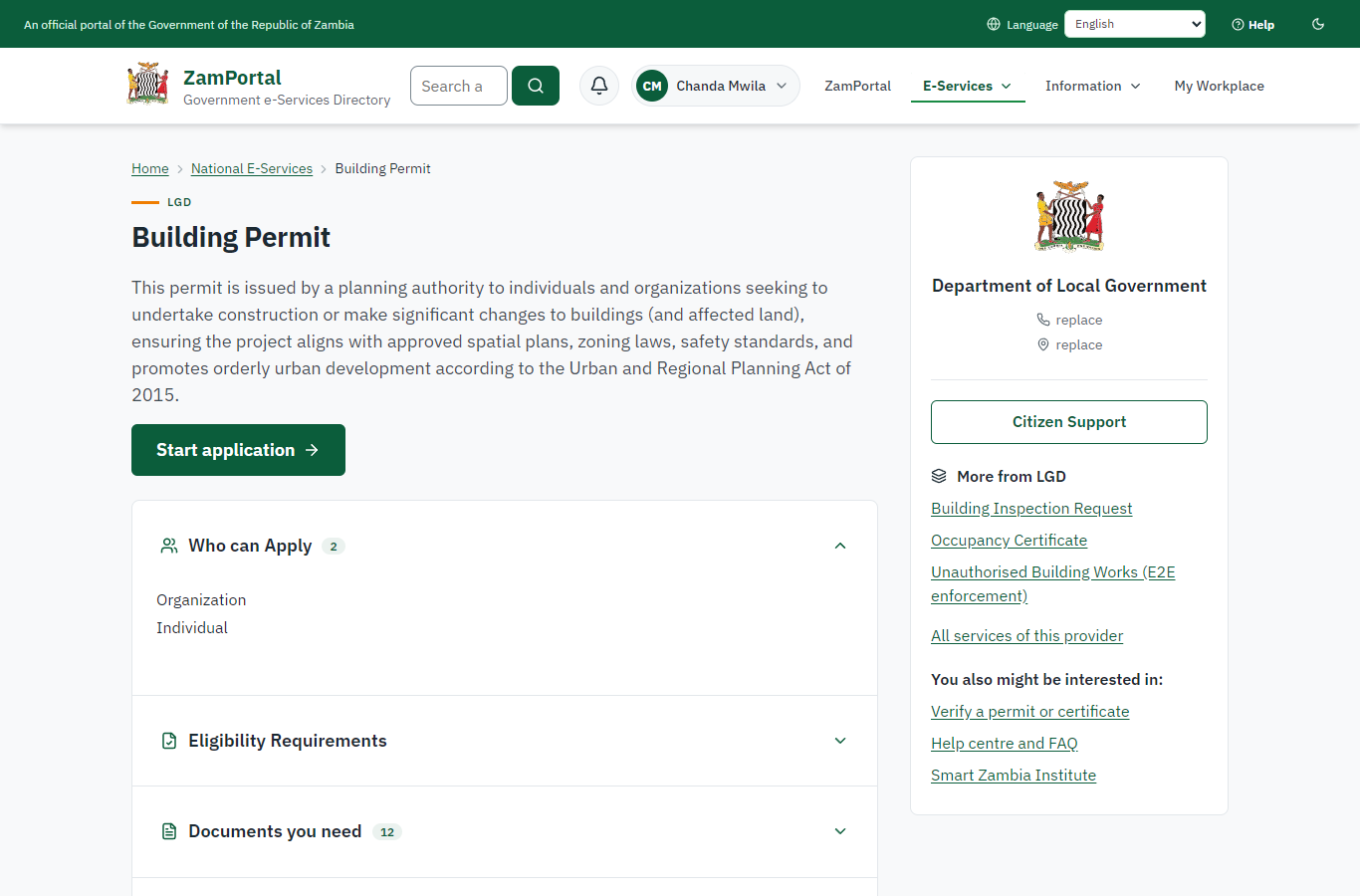
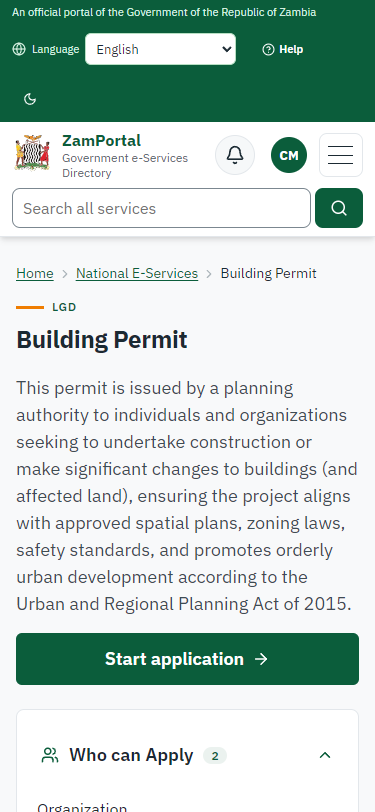
The citizen finds "Building Permit" in the national directory: the council it is offered at, the drawings and documents to have ready (architectural drawings and site plan as PDF, proof of ownership) and how the fee is worked out (approved rates per m2 of floor area).
Step 2. Apply with the drawings
Citizen · National e-Services portal (sent through the API the portal uses in the test run: no screenshot)
The citizen answers the form (the plot by its parcel number E2E/BC/38 with its position, use, floor area 180 m2, two storeys, the architect and their registration number, and the imported form's own questions about the building) and uploads the architectural drawings, the site plan and the proof of ownership as PDF. The server checks the plot against the parcel register (a parcel it does not know is refused) and reads every drawing with the platform's strict PDF reader (damaged, encrypted or scripted files are refused). Application LGD-BP/00001/10-22-26 is received; development BC-2026-00001 is in the register as "Applied for".
Step 3. Take the application on
Case Officer · Back office (done through its case API in the test run: no screenshot)
The Case Officer takes the new application on (assigned to them). The case moves from "Submitted" to "CO Review".
Step 4. The development, its plot and the checks
Case Officer · Back office
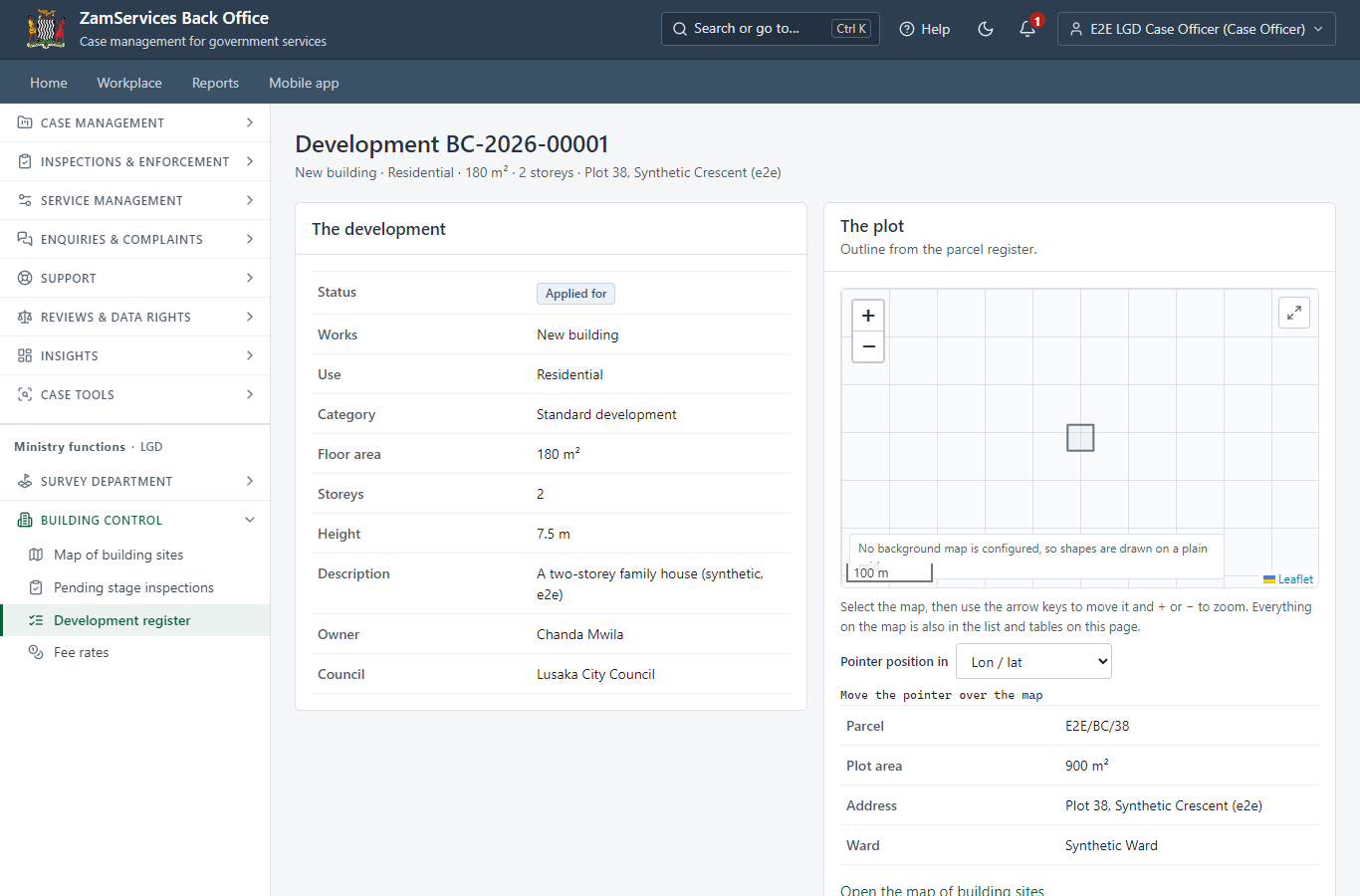
Ministry functions -> Building control -> the development: what is built, the plot outline from the parcel register on a map, the plot / title / zoning checks (here: a current parcel; the land register is not on this installation, so the title is checked from the documents), the professional of record with the registration number to check, the referrals and the drawings.
Step 5. Refer the application to departments
Case Officer · Back office
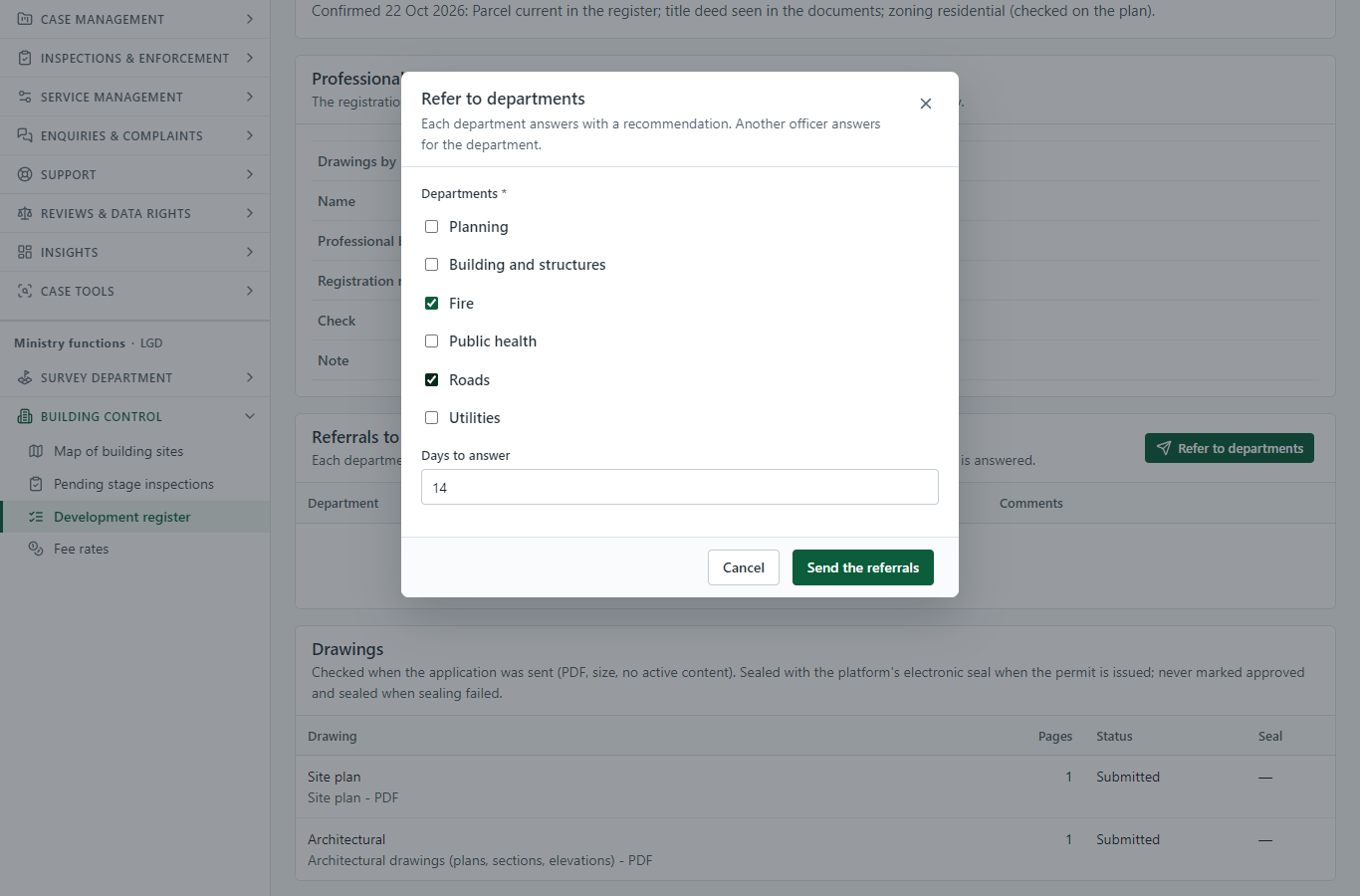
The officer refers the application to the departments concerned (the council's list: planning, structures, fire, public health, roads, utilities). The application cannot move on until each department has answered.
Step 6. The departments answer
Case Officer (another officer, for the departments) · Back office
Another officer answers for each department with a recommendation (no objection, with conditions, objection) and comments. The officer who sent a referral cannot answer it (the server refuses it).
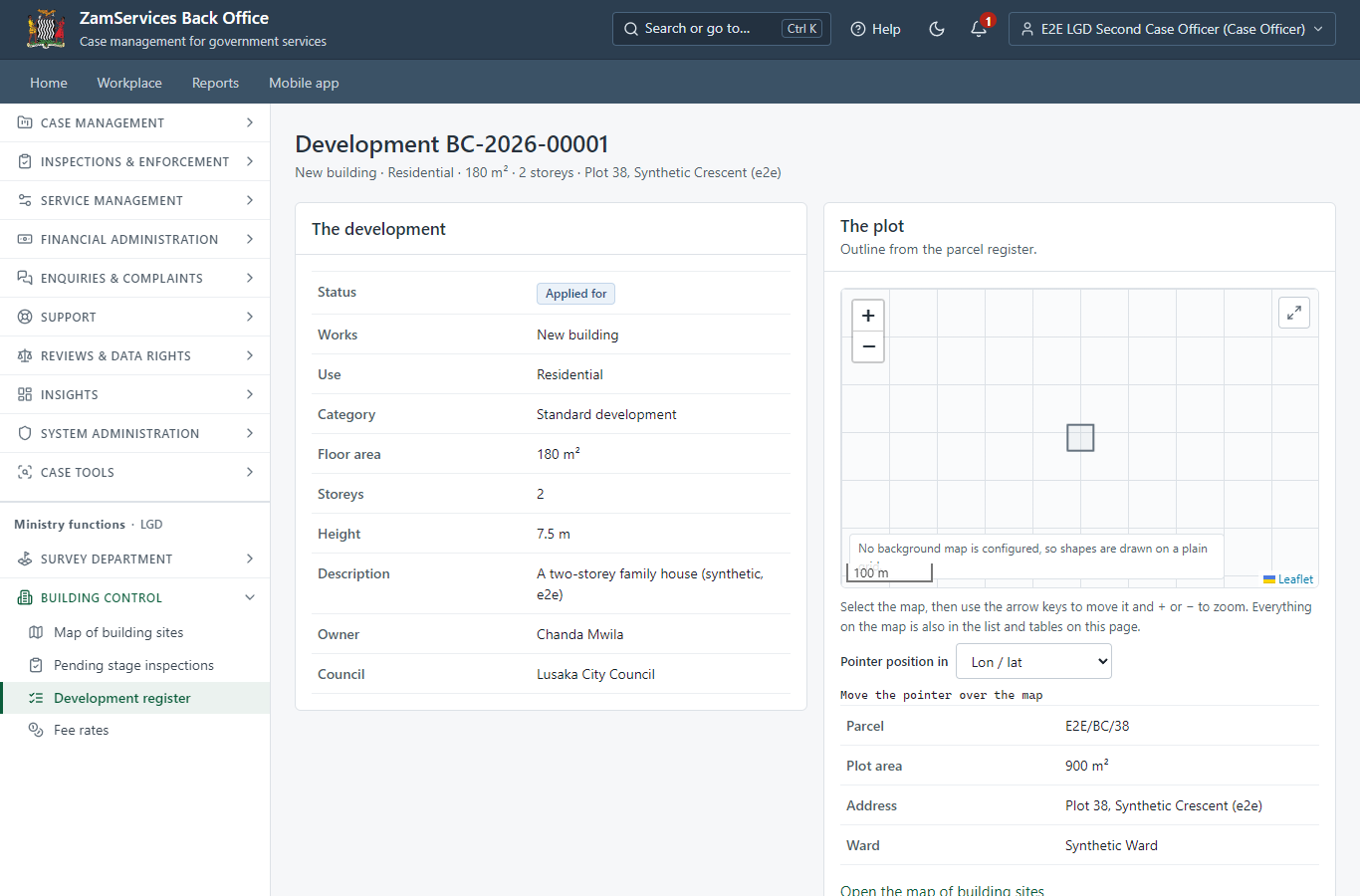
Step 7. Refer to the departments and collect their answers
Case Officer · Back office (done through its case API in the test run: no screenshot)
The Case Officer completes "Refer to the departments and collect their answers". The case moves from "CO Review" to "CO Generate Payment".
Step 8. Set the fee (approved rates per m2 of floor area)
Case Officer · Back office (done through its case API in the test run: no screenshot)
The officer sets the fee the system worked out from the council's approved building control rates: Building permit (ZMW 15.00 per m2 x 180 m2 + ZMW 500.00), ZMW 3200.00. The citizen is invoiced.
Step 9. Pay the permit fee
Citizen · National e-Services portal
The application waits for the payment in My Workplace, with a Pay button (ZamPay: mobile money or bank card).
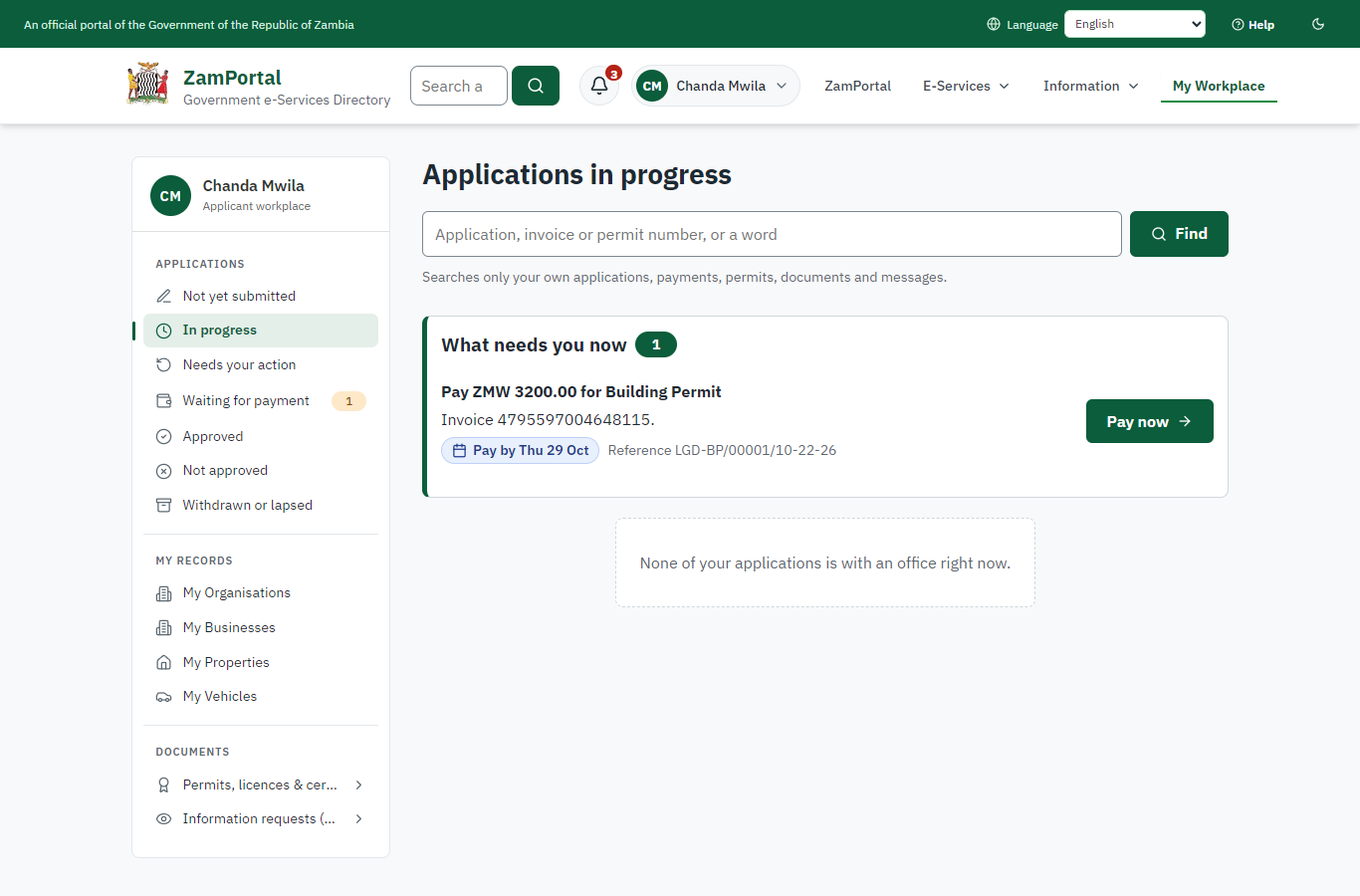
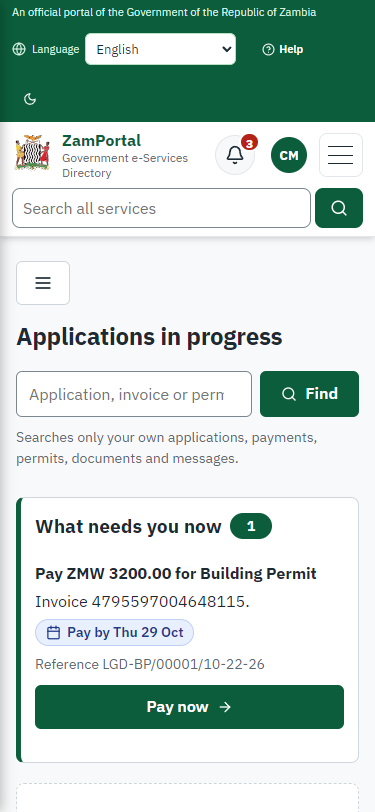
Step 10. Verify Payment
Case Officer · Back office (done through its case API in the test run: no screenshot)
The Case Officer completes "Verify Payment". The case moves from "CO Verify Payment" to "EX Decision".
Step 11. The plans committee decides
Plans committee (chair: Executive) · Back office (done through its case API in the test run: no screenshot)
The chair puts the application on the agenda of a meeting of the plans committee (PCE/2026/1 in this run), records who attended (the quorum is checked) and the resolution "approve" with its reasons, and closes the meeting. Closing it decides the application; deciding it by hand is refused.
Step 12. The permit in My permits
Citizen · National e-Services portal
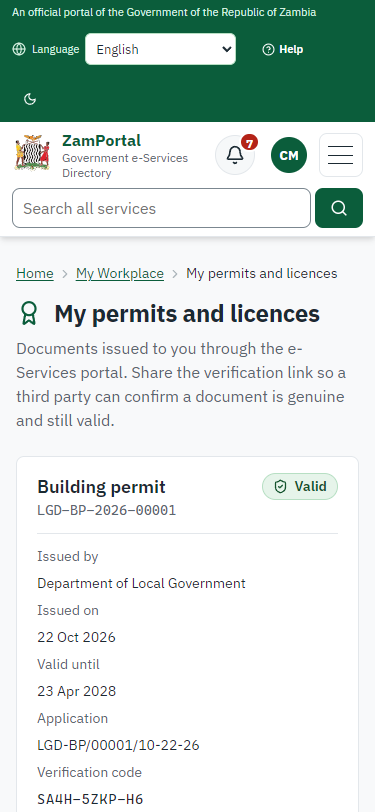
The building permit is listed in "My permits and licences" with the development, the plot (and its outline on a small map), the stage reached and the next stage to notify - a generic block any permit can show - and a download of the sealed PDF. The sealed approved drawings are in the application's documents.
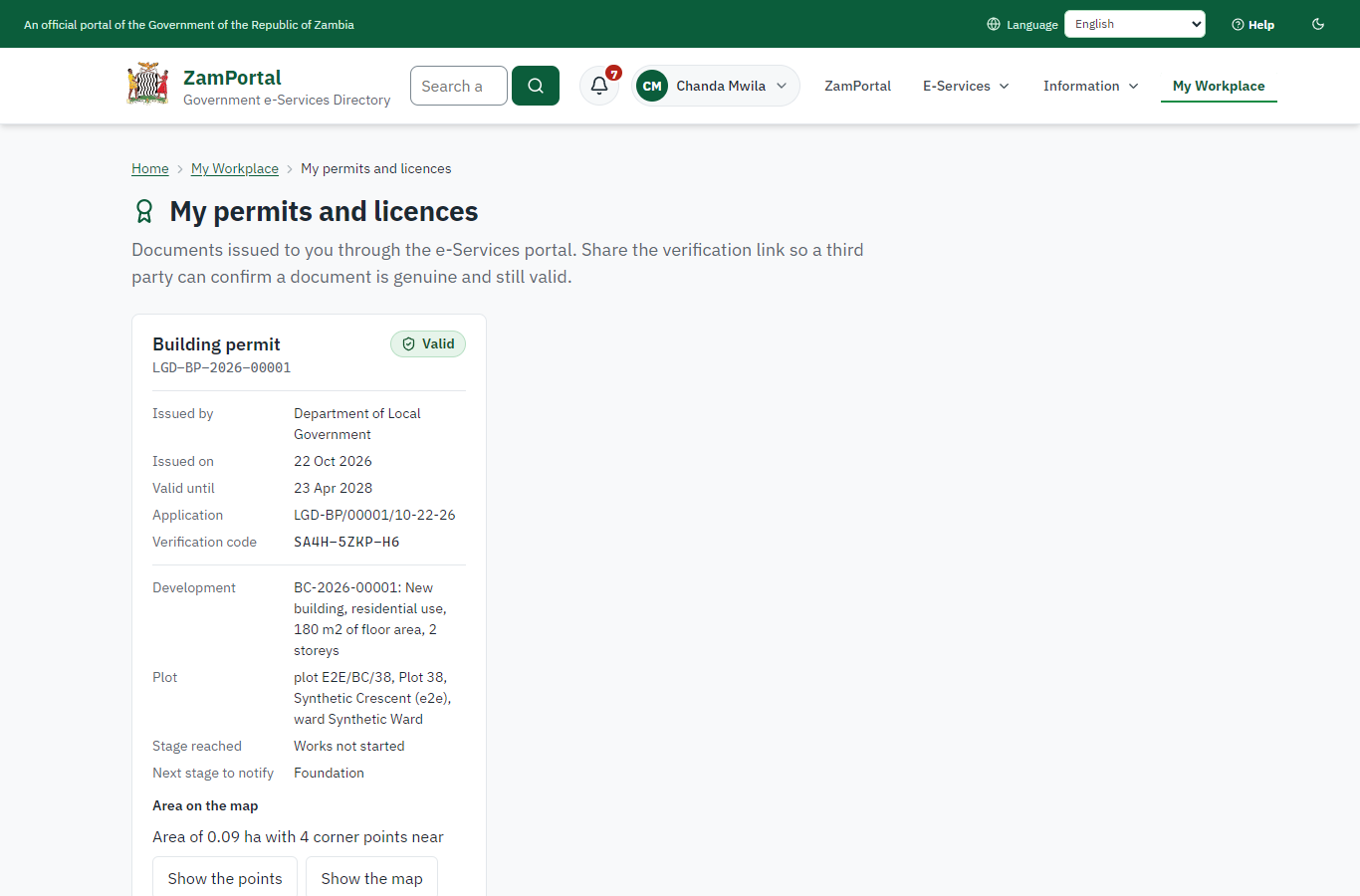
Step 13. Verify the permit
Anyone (public) · Public verification page
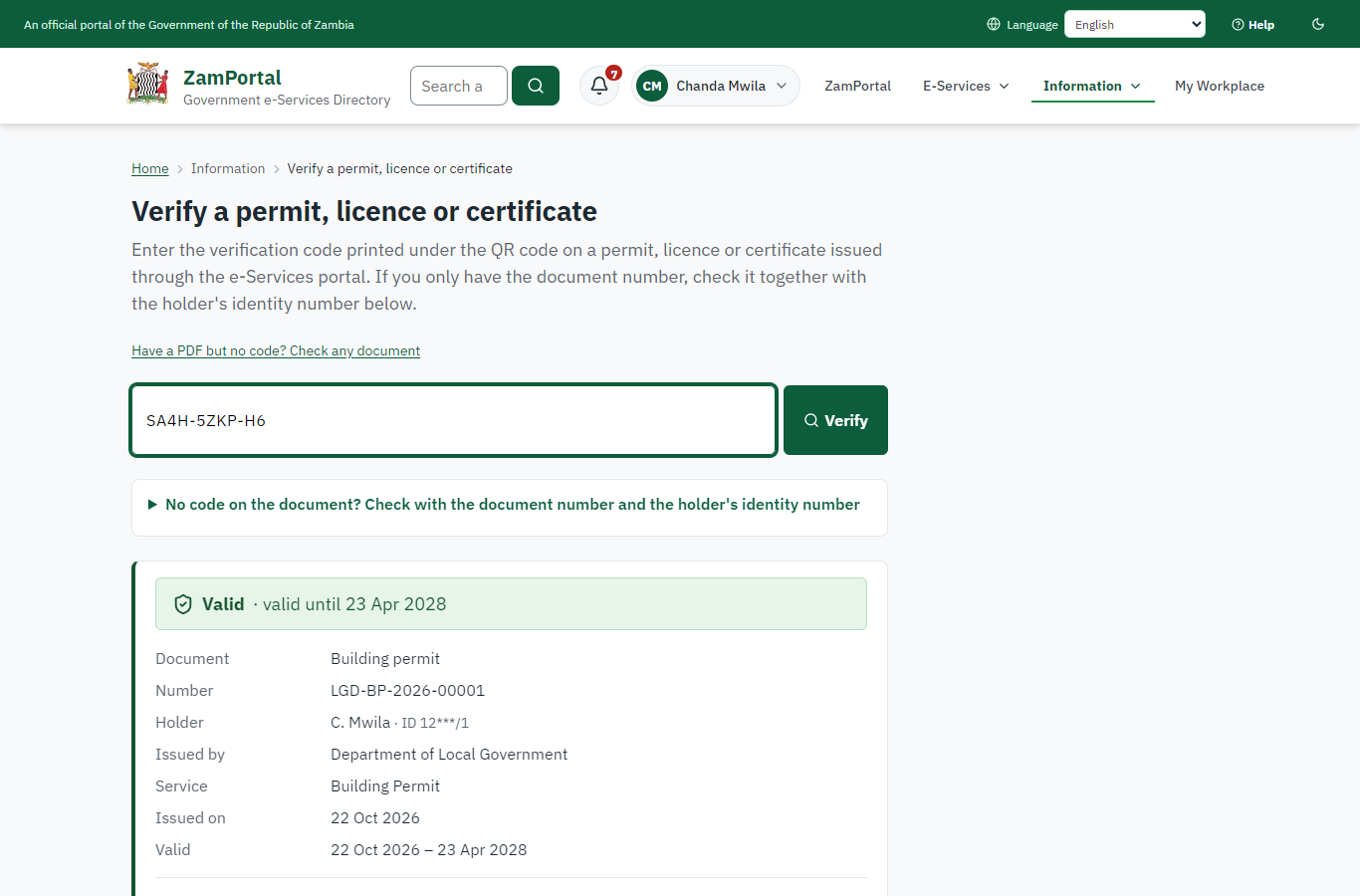
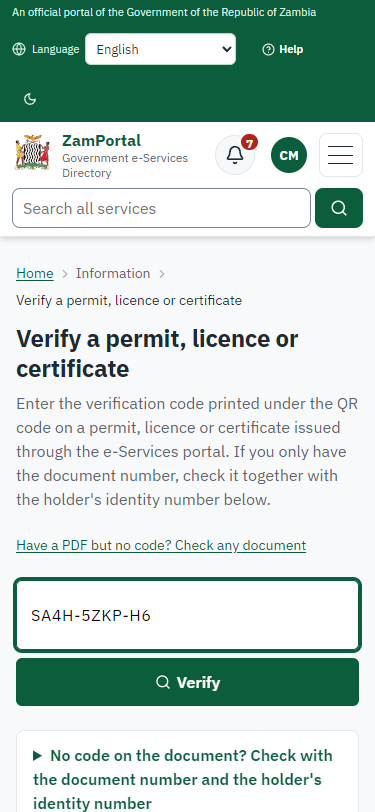
The QR code on the permit opens the public verification page: genuine and current, whether the electronic seal is valid, and the plot (parcel number and its outline on a map). No owner details are shown.
3. Payment
| Item | In the test run |
|---|---|
| Fee | ZMW 3,200.00: approved rate ZMW 15.00 per m2 x 180 m2 of floor area + ZMW 500.00, worked out by the system from the development on record |
| When it is paid | After the checks and the referrals, before the plans committee |
| Invoice number | 4795597004648115 |
| Paid through | ZamPay (the ZamPay test double in this run) |
On screen: step 9 (Pay the permit fee) in section 2.
4. Output documents
Building permit (sealed PDF)
The permit issued when the plans committee approves: the development (reference, works, use, floor area, storeys), the plot, the stages to notify for inspection and the commencement deadline as its conditions; sealed with the platform's electronic seal. The approved drawings are sealed the same way.
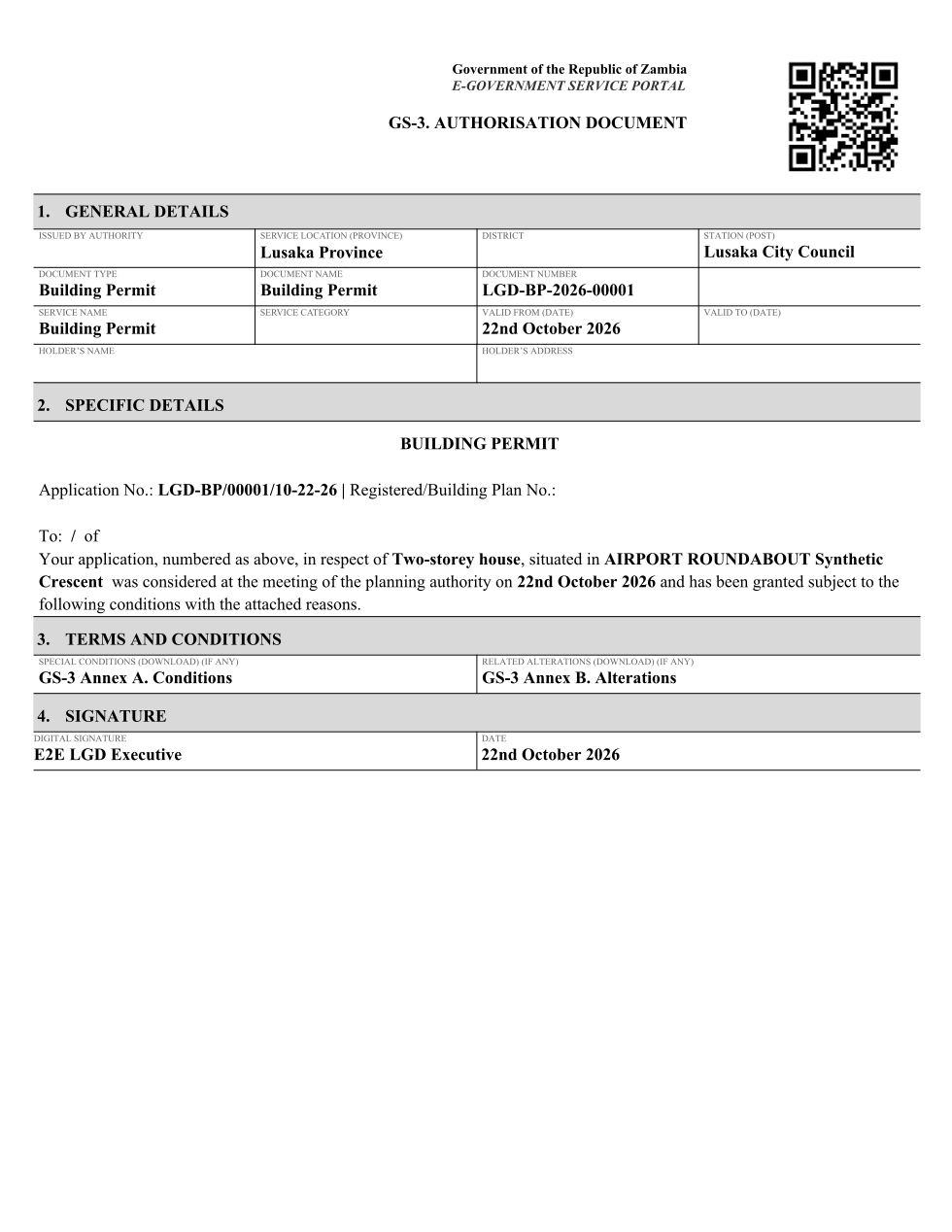
The issued PDF has 2 pages; the image shows the first.
Fields
| Field | Value in the test run |
|---|---|
| Document title | Building permit |
| Permit / licence number | LGD-BP-2026-00001 |
| Holder | Chanda Mwila |
| Valid from | 2026-10-22 |
| Valid until | 2028-04-22 |
| Status | active |
| Verification code (printed with a QR code) | SA4H-5ZKP-H6 |
Seal
| Item | Detail |
|---|---|
| Seal status | sealed |
| Signature level | PAdES-B-T |
| Sealed by | the platform seal (development key in the test run) |
| Signed at | 2026-10-22T02:51:10.821Z |
| Trusted time-stamp | 2026-10-22T02:51:10.816Z (time-stamping authority) |
| Document fingerprint (SHA-256) | dfbc84ed3bf89ca3... |
Verification
| Item | Detail |
|---|---|
| Where | The public verification page of the national portal, <portal>/verify/<verification code>, opened by scanning the QR code on the document. |
| What it shows | Whether the document is genuine and current, its holder and validity, and whether the electronic seal is valid and who sealed it. |
| Checking a copy | Anyone can upload a PDF they were given; the page says whether it is exactly the document that was issued. A changed copy is reported as not matching. |
On screen: step 12 (The permit in My permits), step 13 (Verify the permit) in section 2.
5. Notifications
| When | Channel | To | Message | Delivery |
|---|---|---|---|---|
| Application received | in-app (portal bell) | the applicant | Application LGD-BP/00001/10-22-26 received - Your application LGD-BP/00001/10-22-26 for Building Permit has been received by Department of Local Government. | shown |
| Status changed | in-app (portal bell) | the applicant | Update on application LGD-BP/00001/10-22-26 - LGD-BP/00001/10-22-26 (Building Permit) is now: With the office - being reviewed. | shown |
| Payment due (invoice raised) | in-app (portal bell) | the applicant | Payment due for application LGD-BP/00001/10-22-26 - The fee of ZMW 3200.00 for Building Permit (LGD-BP/00001/10-22-26) is now due. Invoice 4795597004648115. | shown |
| Payment received | in-app (portal bell) | the applicant | Payment received for LGD-BP/00001/10-22-26 - Your payment of ZMW 3200.00 for LGD-BP/00001/10-22-26 (Building Permit) has been received. Receipt: <ZamPay>/pdf?documentType=receipt&invoiceNumber=4795597004648115 | shown |
| Licence / permit issued | in-app (portal bell) | the applicant | Your Building Permit document has been issued - LGD-BP-2026-00001 has been issued for Building Permit and is valid until 23/04/2028. | shown |
| Invitation to rate the service | in-app (portal bell) | the applicant | How was Building Permit? - How was Building Permit? Tell us in about a minute. | shown |
| Decision: approved | in-app (portal bell) | the applicant | Application LGD-BP/00001/10-22-26 completed - LGD-BP/00001/10-22-26 (Building Permit) is complete. Your documents are ready. | shown |
| Application received | sms | +260 97* *** 567 | Application LGD-BP/00001/10-22-26 for Building Permit has been received. Track it: <portal>/my-workplace | delivered |
| Application received | e2e.c***@example.test | Application LGD-BP/00001/10-22-26 received | skipped | |
| Status changed | sms | +260 97* *** 567 | delivered | |
| Payment due (invoice raised) | e2e.c***@example.test | Payment due for application LGD-BP/00001/10-22-26 | skipped | |
| Payment due (invoice raised) | sms | +260 97* *** 567 | Fee of ZMW 3200.00 due for LGD-BP/00001/10-22-26. Invoice 4795597004648115. Pay: <ZamPay>/pay-for-service/get-invoice/4795597004648115 | delivered |
| Payment received | sms | +260 97* *** 567 | delivered | |
| Invitation to rate the service | sms | +260 97* *** 567 | skipped | |
| Licence / permit issued | e2e.c***@example.test | Your Building Permit document has been issued | skipped | |
| Invitation to rate the service | e2e.c***@example.test | How was Building Permit? | skipped | |
| Licence / permit issued | sms | +260 97* *** 567 | delivered | |
| Decision: approved | e2e.c***@example.test | Application LGD-BP/00001/10-22-26 completed | skipped | |
| Decision: approved | sms | +260 97* *** 567 | delivered |
Delivery: shown = in the portal's notification bell; delivered = the SMS gateway (a test double in this run) reported the text delivered; skipped = not sent on that channel (e-mail is not configured on the test installation, and some notices go out on one channel only); sent by the national portal = a ministry node handed the notice to the national portal, which texts and e-mails the citizen under its own name and the citizen's preferences. Addresses written <portal>, <ZamPay> stand for the national portal and ZamPay.
6. Legacy mapping
| Item | Detail |
|---|---|
| Replaces | Building Permit in the legacy ZIGS e-Services directory (ZIGS_Services) |
| Legacy service id | 647 |
| Legacy provider | Department of Local Government (LGD) under Ministry of Local Government and Rural Development |
| Legacy process | not recorded |
| Fee in the legacy system | none |
| Fee taken before submission | yes (as in ZIGS) |
| Time to issue (legacy) | not recorded |
| Legacy output templates | GS-1 Application for a Government Service: ZIGS_Forms_ZDA / GS1 GS-2 Notice of Government Action: ZIGS_Forms_Notices / GS-2.NoticeOfAction Building Permit: / BuildingPermit.GS3 Building Permit (amendment): / BuildingPermitAmendment.GS3 |
| Legacy address | https://ecouncils.gsb.gov.zm |
| How it was brought over | Imported by the platform's legacy catalogue importer (zcm-backend scripts/zigs/importLegacy.js) from the ZIGS snapshot: form, case types, fees, documents, process and output templates, then served by the new platform. |
7. Version and date
| Item | Detail |
|---|---|
| Document version | service v1, platform a4ce8843 |
| Generated | 2026-10-22T02:52:08Z (by the end-to-end run, not edited by hand) |
| Service version | not versioned (configured directly) |
| Platform snapshot | backend a4ce8843 portal f14fd24 back office 7887a35 |
| Test suite | e2e d7c2863; one installation (combined); seed profile mihud |
| Journeys | 38-building-permit-stage-inspections.spec.js: citizen: finds the service and applies for a building permit with the drawings - passed 38-building-permit-stage-inspections.spec.js: officer: plot checks and the architect confirmed, referrals answered; the fee from the approved rates - passed 38-building-permit-stage-inspections.spec.js: citizen pays; the plans committee approves; the permit is issued with the drawings sealed - passed 38-building-permit-stage-inspections.spec.js: citizen: the permit in My permits with the plot; sealed; verifies with the plot's map - passed 38-building-permit-stage-inspections.spec.js: foundation: notified; planned from the queue; recorded off site - held, refused; on site - verified, signed off - passed 38-building-permit-stage-inspections.spec.js: slab, roof and final: each verified on site and signed off; the map follows the stage reached - passed 38-building-permit-stage-inspections.spec.js: occupancy certificate: once, after the final stage; paid; sealed; the development completed - passed |
| Result | 7 of 7 journey tests passed |
| Data | Synthetic test data on a local test installation; provider test doubles for ZamPass, ZamPay, SMS and signing. |